
Architecture
Zato is an open-source, Python-based, platform designed for integrations, automation, orchestration, interoperability, and the building of AI and API-first, server-side systems.
Terms like an AI control plane, MCP gateway, integration platform, IPaaS, enterprise service bus, API server, automation engine, service-oriented platform, interoperability engine or integration layer, are commonly used to describe the platform's capabilities.
Zato is specifically designed for people who want to use Python, often along with AI, to develop their integrations even faster.

Basic concepts
Each Zato environment runs in a Docker container. To streamline deployments, there is a single image that each environment uses, from development, through tests to production, it's always the same image.
An environment will run anywhere Docker will, on premises, in any cloud, with special support for Azure deployments available.
Hybrid deployments are supported - you can deploy in the cloud and use the built-in on-prem gateway to access your internal systems securely.
You can connect your LLM to help you design and build your environments and Python-based integrations.
Each server will have its Dashboard, and each environment will have a scheduler for scheduled jobs and tasks that run in the background, as well as a rule engine for your Python services
A built-in message broker with message queues lets you implement publish/subscribe scenarios (Kafka and other brokers are supported too)
For B2B and other integrations, you can use SFTP, FTP or SMB for file transfer, including EDIFACT or HL7 messages
Your API partners can access a Swagger-like OpenAPI console
In addition to a plug-in for Visual Studio code, a built-in Python IDE is available directly through each Dashboard, without a need to install additional apps on your computer. Simply install Zato, and you have everything that's needed for work.
Deploy-on-save from your editor is provided out-of-the box - through the mounted project directory of the blueprint or through the VS Code plugin for remote servers.
Hot-deployment is one of the fundamental concepts in Zato, particularly during development - when you deploy a new version of a service to a server, only that one service will be reconfigured and changed, there is no need to restart an entire server in such a case. Hot-deployment of new functionality is counted in milliseconds.
For DevOps and CI/CD pipelines, to ensure repeatable builds, you can export the entire configuration of your services to a YAML file that can be stored and versioned in git, and a container will import its contents when it's starting.
Servers and API integrations

Servers in each environment always execute the same code, no matter if your environment is an active/active or an active/standby one.
Requests are accepted by channels and external resources are accessed through outgoing connections.
Servers don't need to be able to communicate directly, which means they don't need direct TCP communication paths between each other. This makes it possible to have servers in different regions or data centers, e.g. one in US East, another in US Central, with a load-balancer in front of them.
Each server executes business services written in Python - to learn more about what a Zato service is, read the high-level overview.
Services can be independent of a particular data format of channel, e.g. the same service can use REST, JSON-RPC, File transfer, IBM MQ, AMQP, HL7 or other communication means.
Services require little RAM in runtime and little time to deploy. A typical service will consume roughly 1 MB of RAM when idle and will require less than 1 ms to deploy. Hence, even a server with 500 or 1000 services will require little computing resources to operate, implying low electricity and cooling costs as well as low CO2 emission and environmental impact.
Services can accept requests through a range of channels. They can invoke other systems through one of many outgoing connection types, such as REST, GraphQL, AMQP, Microsoft 365 or other cloud services, HL7, SQL, MongoDB and various others typically used in backend environments.
Each server acts as a cache with a Python API for your services. The contents of the cache is also accessible through the server's dashboard.
Publish/subscribe message broker

Each server can act as a publish/subscribe message broker offering topics and queues to asynchronous publishers and subscribers. Each server is an independent message broker and they don't share their queues with each other.
The message broker is multi-protocol and can be used by Python, REST or File transfer clients. Each environment's Dashboard acts as a GUI to manage the topics, queues and endpoints participating in pub/sub integrations.
Scheduler

Each environment may use a highly configurable scheduler whose jobs can be triggered in predefined intervals.
Each job invokes a service on a server. Because services are protocol independent, it means that the same service can be made available to external API clients and, internally, to the scheduler as well.
It is possible for services to schedule jobs dynamically in runtime, for instance, in reaction to other events taking place in integration processes, e.g. a zero-trust network may offer access to resources through automation that creates accounts on demand and then cleans everything up after N minutes.
On-prem systems
When Zato runs in the cloud, the on-prem gateway connects it to the databases, APIs and other systems in your private network.
The gateway is installed on a host in the private network and connects out to the Zato container over HTTPS, so there is no VPN and no inbound firewall rule to open.
Outgoing connections use the addresses of the on-prem systems as they are, e.g.
erp-db.corp.local:5432, and the same connection definitions work whether Zato runs in the cloud or in the same network as the systems.
Single-server environments
A single-server environment has one Docker Quickstart container running, with a server, its dashboard and the scheduler, all inside the same container. It is one of the two production topologies, the other being multi-server environments.
When to use single-server environments
Use a single quickstart container when you want a working environment in a few seconds or minutes. It is the first choice unless your installation specifically requires multiple servers.
All components run in the same container, whereas a multi-server environment spreads across multiple containers, possibly across multiple geographic regions.
If you can tolerate the downtime between the primary container going down and a new one spinning up, a single server in a single container is the simplest choice, with the least work required to get it running.
If you need high availability, use a multi-server environment.
A single-server environment using Docker Quickstart
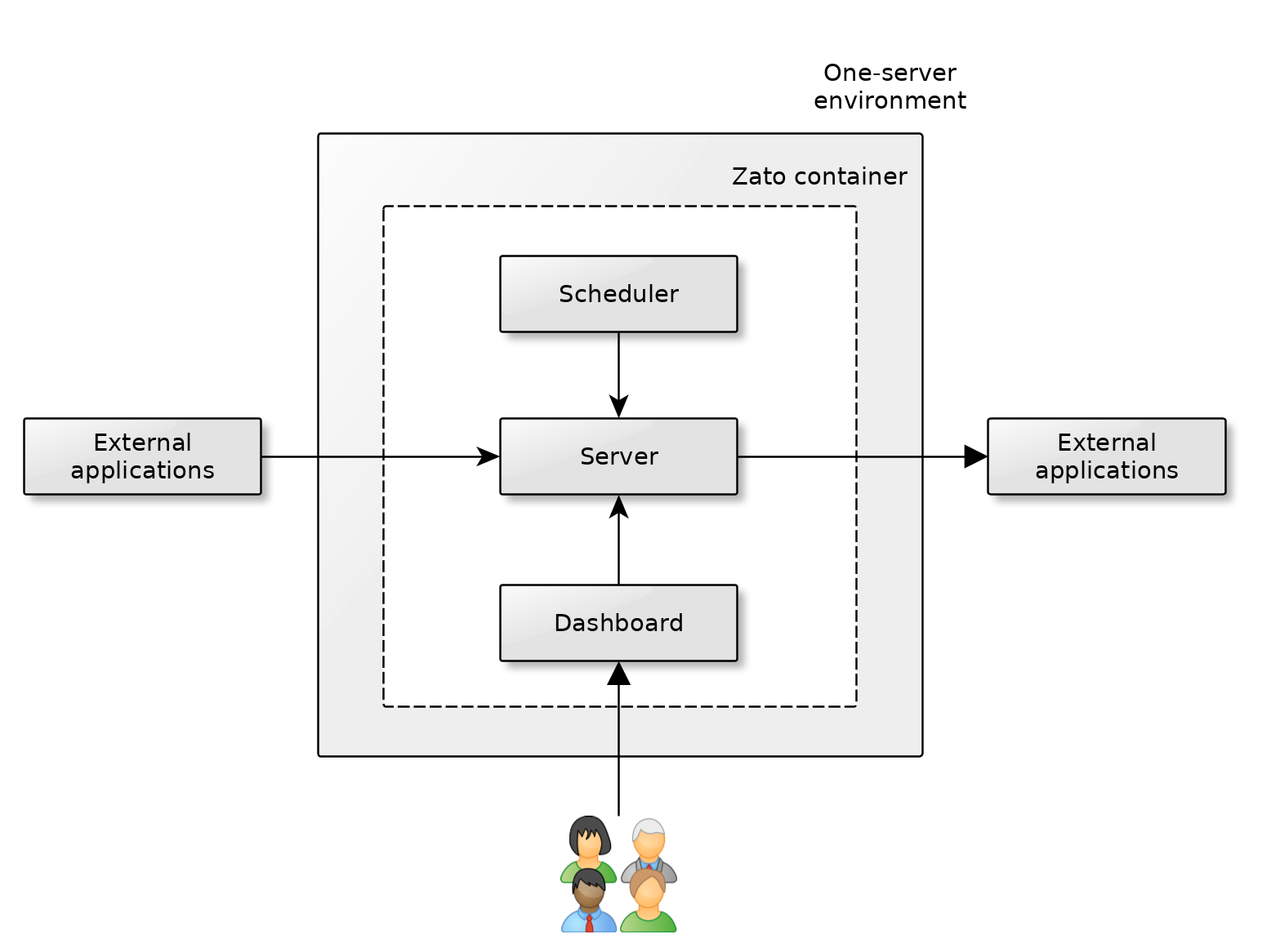
A single quickstart container with one server is the canonical unit of production deployment - multi-server deployments build on what a container of this kind offers.
External applications invoke the container's server through the load-balancer that the container itself runs. SSL/TLS is terminated there: mount your certificate as
zato.pemand the container serves HTTPS on port 11224 - see SSL/TLS. If your organisation terminates TLS centrally instead, on a load-balancer of its own in front of the container, that works equally well, and the two are alternatives rather than layers. Traffic shaping likewise happens before the request reaches the server, either at Zato's own rate limiting or at that external load-balancer.The server offers API services and invokes external applications, as needed in a given project or integration.
The container's scheduler runs in background and it periodically triggers its configured jobs which in turn invoke services from the server. Conversely, the server may need to access the scheduler too, e.g. to change its configuration.
The web-based Dashboard is used by developers and admins to manage the environment in runtime - you can open the TCP traffic to the server and dashboard independently, for instance, to grant access to the dashboard only from specific IP addresses, while letting external applications access only the server. The server uses port 11223 and the dashboard is on port 8183.
There is never any need for external applications to access the scheduler or the Dashboard directly.
All of these components - the server, dashboard and scheduler - are inside the same container and to stop or restart them, use Docker's own commands, e.g.
docker stopordocker run.
How to create single-server environments
Use Docker Quickstart to create your environment. This is a pre-built, always up-to-date image with the extra features that production environments need.
Zato environments can be built with any DevOps, automation and provisioning tools - you can embed the Docker Quickstart image in any containerization product or platform, e.g. Docker Compose or Kubernetes.
Zato environments can be also built in advance, e.g. with Packer, to be deployed with Terraform or other infrastructure-as-code products.
Before the environment takes real traffic, apply the production best practices.
Multi-server environments
A multi-server environment has more than one Docker Quickstart container running, with a total of more than one server. An external load-balancer distributes the incoming traffic to one or more servers.
This is in contrast with single-server environments that have one Zato container with one server.
When to use multi-server environments
Use multi-server environments if you would like to:
- Scale your environment horizontally, by adding more servers
- Implement HA (High Availability), by adding standby or active servers
Architectural considerations
If you have more than one server in your environment, consider that all of them run independently of each other, which means that:
If you use publish/subscribe, note that message queues are not shared across servers and each server will effectively act as a separate message broker. It means that you should use pub/sub on only one server in the whole environment, unless you specifically want for each server to be an independent message broker.
If you use the scheduler, it must be started in only one container in the whole environment. All jobs will always run in this container's server. It also means that one-time tasks scheduled dynamically should only be created by that one server.
If you don't use either pub/sub or the scheduler, you can add multiple servers with an external load-balancer in front of them without any further considerations.
What load-balancer to use
Most of the mainstream load-balancers will work well with Zato. The most commonly used ones are HAProxy, Envoy, NetScaler and AWS ELB.
Active/standby environments

- In an environment of this type, there's one server that actively processes incoming requests. If you use pub/sub, all messages will be processed on this server. If you use the scheduler, all tasks run on this one server as well.
- Another server acts as a mirror copy but its container is not started and it doesn't accept any requests yet.
There are two ways to implement the standby server:
- Don't keep the host running - rather, start it only when it's required for the standby to take over the traffic, and then start a container on the host.
- Keep running the host on which a container with the standby server will run, but don't start the container until it's required.
Which way to choose will depend on your preferences and requirements. Consider that:
- If the standby host is not started, it will take a bit more time to first start the host, and then run the container on it. Yet, the startup time of the host is often much shorter than the startup time of the container itself, so it may be that this won't be a concern.
- If the standby host is started, it will always consume processing resources, which incurs costs. At the same time, the time to switch to the standby server will be slightly lower because the host will be already running, so only a container will have to be started.
In either case, the container with the standby server is not started until it's needed. It's only a question whether the host should be always running in the background or not.
It's recommended to choose the first method initially - not keeping the standby host running - and switch to the other one if you decide that it will be beneficial in your case.
The very act of switching the traffic from the active server to the standby one will be implemented using your own provisioning scripts and CI/CD pipelines.
Each Zato container will give you monitoring endpoints that let you decide whether the components inside the container are running or whether the standby server should be started.
For instance - your monitoring tool will be pinging the active server's monitoring endpoint once in 30 seconds. If 3 pings are missed, it will trigger a CI/CD script. The script will stop a container with the first server, and then the same script will start a new container on the mirror host, which becomes the new active server, then the script will notify your monitoring product, and the load-balancer in front of the servers, with information about which server is the active one and which is the standby now.
Active/active environments

In an environment of this type, there's more than one server that actively processes incoming requests. If you use the scheduler, you need to configure the containers to start the scheduler on only one of them.
Because multiple servers handle incoming requests, the environment is highly available, and more servers mean more throughput.
By default, a starting container will start the scheduler. To prevent it, pass the
Zato_Start_Scheduler=Falseenvironment variable when the container is starting. If you don't set this flag, or if you set it to True, the container's server will start the scheduler.For instance - if you have 5 servers, and you set the scheduler's flag to False on 4 of them, only the fifth one will start the scheduler.
Zato_Start_Scheduler=False also stops running the outgoing connection health checks, because they are scheduled jobs. That is the intended split - the one container that runs the scheduler runs them for the whole environment.There are no limits as to how many active servers you can have in an environment.
Servers don't need to have direct TCP connectivity enabled between them. It means that each can run behind a firewall, with a load-balancer in front of them all, and each server can potentially be installed in a different geographic region.
Note that the server running the scheduler doesn't need to accept API requests from the load-balancer. If it suits your requirements better, you can just treat it as a server dedicated to that task, without the overhead of handling incoming requests.
Before the environment takes real traffic, apply the production best practices.
See also
| Feature | What it does |
|---|---|
| Docker Quickstart | The image every container in the environment runs on |
| Production best practices | The configuration to apply before real traffic arrives |