
 Microsoft SQL Server in Python
SQL Server queries with bound parameters, stored procedures and large result sets from Python services.
Microsoft SQL Server is widely used in enterprise environments, particularly in organizations with existing Microsoft infrastructure. Zato provides direct support for MS SQL through connection pools configured in the Dashboard.
MS SQL connections in Zato support both direct SQL execution and stored procedure calls, giving you flexibility in how you interact with your databases.
Creating a connection
In the Dashboard, navigate to Connections -> Outgoing -> SQL and create a new connection. Select MS SQL as the database type and provide your connection details.
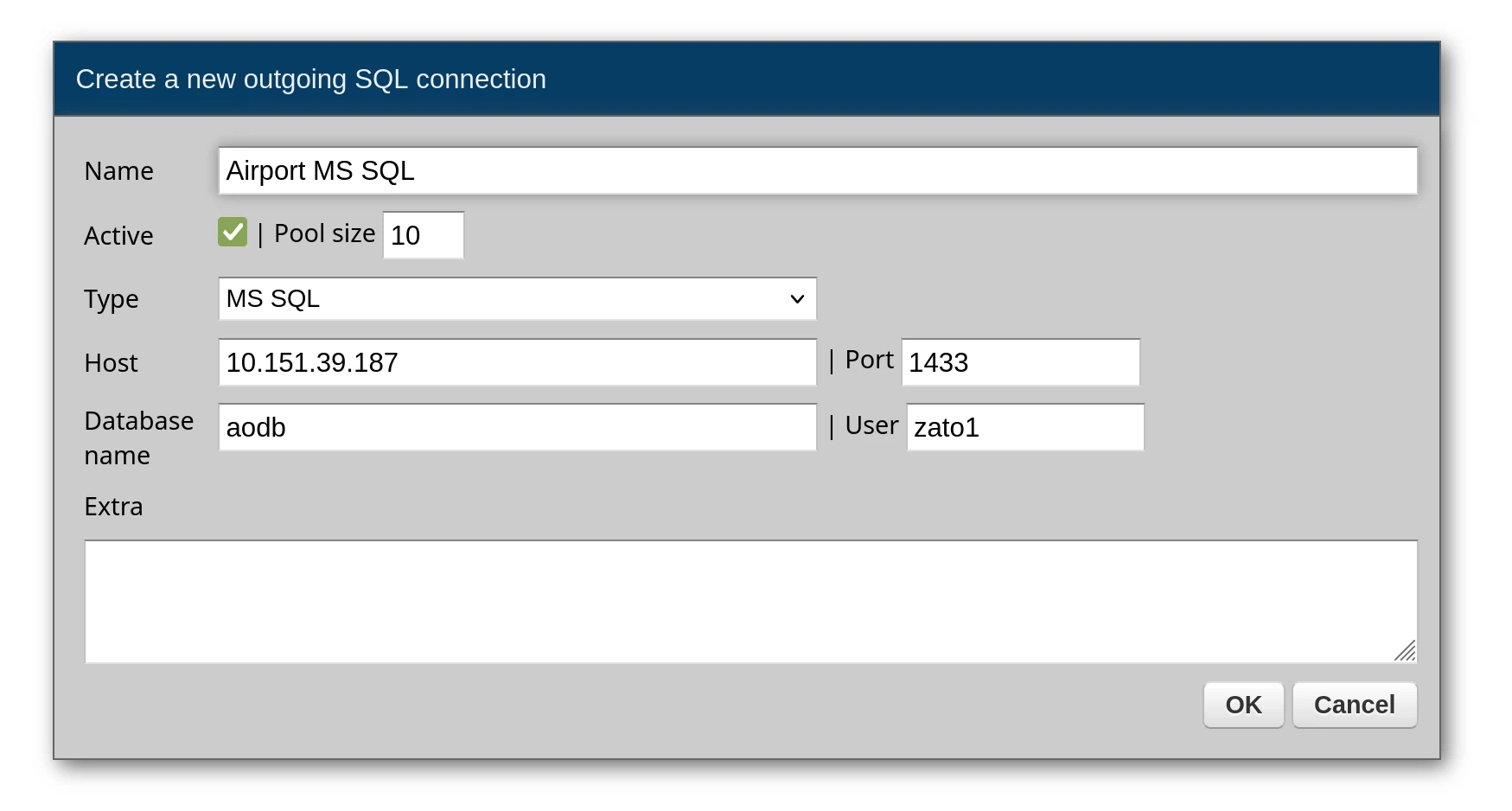
After creating the connection, change the default password and test the connection before using it in your services.
Executing queries
Run SQL statements through conn.execute, passing parameters as a dictionary. Each :name marker in the statement is bound to the parameter of the same name by the server, so the values never become part of the SQL text. Results arrive as a list where each element is a dictionary representing one row.
# -*- coding: utf-8 -*-

# Zato
from zato.server.service import Service

class GetPassengers(Service):

    def handle(self):

        # Get the connection by name
        conn = self.out.sql['Airport MS SQL']

        # Query with a named parameter
        query = 'SELECT PassengerID, FullName, SeatNumber FROM Passengers WHERE FlightID = :flight_id'
        params = {'flight_id': 1042}

        # Execute returns a list of dicts
        result = conn.execute(query, params)

        self.response.payload = result
Response:
[
    {"PassengerID": 7781, "FullName": "John Smith", "SeatNumber": "12A"},
    {"PassengerID": 7782, "FullName": "Maria Johnson", "SeatNumber": "12B"}
]
A statement can also run a stored procedure with EXEC, in which case its first result set is what comes back:
# -*- coding: utf-8 -*-

# Zato
from zato.server.service import Service

class GetCompanyGuarantors(Service):
    """ Returns a list of company guarantors from the database.
    """
    def handle(self):

        # Connection to use
        conn = self.out.sql['Airport MS SQL']

        # A stored procedure invoked as a statement
        result = conn.execute('EXEC company.spGetCompanyGuarantors')

        # Build a list of guarantor objects from the result
        guarantors = []
        for row in result:
            guarantors.append({
                'company': row['CompanyName'],
                'company_id': row['CompanyIdentifier'],
                'guarantor': row['GuarantorName'],
                'email': row['GuarantorEmail'],
                'phone': row['GuarantorPhone']
            })

        # Return the guarantors to the caller
        self.response.payload = guarantors
Values such as datetime objects come back as Python objects and are formatted before they go into a JSON response:
# -*- coding: utf-8 -*-

# stdlib
import datetime

# Zato
from zato.server.service import Service

class GetWeatherForecast(Service):
    """ Returns weather forecast data from the data warehouse.
    """
    def handle(self):

        # Connection to use
        conn = self.out.sql['DataWarehouse']

        # Query to execute
        query = 'SELECT * FROM ssas.FlagWeatherForecast WHERE ForecastDate >= :since'
        params = {'since': '2026-01-01'}

        # Execute query
        data = conn.execute(query, params)

        # Format the data, converting datetime objects to strings
        result = []
        for item in data:
            formatted = {}
            for key, value in item.items():
                if isinstance(value, datetime.datetime):
                    formatted[key] = value.strftime('%Y-%m-%dT%H:%M:%S')
                else:
                    formatted[key] = value
            result.append(formatted)

        # Return the formatted data
        self.response.payload = result
Querying a single row
To fetch a single record, use conn.one - it returns that record as a dictionary and raises an exception if the query matches zero or more than one row:
# -*- coding: utf-8 -*-

# Zato
from zato.server.service import Service

class GetFlightById(Service):
    """ Returns a single flight by its ID.
    """
    input = 'flight_id'

    def handle(self):

        # Get the connection from the pool
        conn = self.out.sql['Airport MS SQL']

        # Build the query
        query = 'SELECT * FROM Flights WHERE FlightID = :flight_id'

        # Assign input data to query parameters
        params = {'flight_id': self.request.input.flight_id}

        # Run the query - returns a dict directly, raises if not found
        flight = conn.one(query, params)

        # Return the result to the caller
        self.response.payload = flight
When the record may or may not exist, conn.one_or_none is the right choice - it returns None for missing records rather than throwing an error:
# -*- coding: utf-8 -*-

# Zato
from zato.server.service import Service

class FindGateByCode(Service):
    """ Finds a gate by its code, returns None if not found.
    """
    input = 'code'

    def handle(self):

        # Get the connection from the pool
        conn = self.out.sql['Airport MS SQL']

        # Build the query
        query = 'SELECT * FROM Gates WHERE GateCode = :code'

        # Assign input data to query parameters
        params = {'code': self.request.input.code}

        # Run the query - returns dict or None if not found
        gate = conn.one_or_none(query, params)

        # Return the result or an error
        if gate:
            self.response.payload = gate
        else:
            self.response.payload = {'error': 'Gate not found'}
            self.response.status_code = 404
Insert, update, and delete
Writes also take a statement with :name markers and the values in a dictionary. A statement that produces no rows is committed as soon as it completes and returns an empty list.
# -*- coding: utf-8 -*-

# Zato
from zato.server.service import Service

class CreateBaggageClaim(Service):
    """ Creates a new baggage claim record for a flight.
    """
    input = 'flight_id', 'carousel_number'

    def handle(self):

        # Get the connection from the pool
        conn = self.out.sql['Airport MS SQL']

        # Build the INSERT statement
        query = """
            INSERT INTO BaggageClaims (FlightID, CarouselNumber, StartTime)
            VALUES (:flight_id, :carousel, GETDATE())
        """

        # Assign input data to query parameters
        params = {
            'flight_id': self.request.input.flight_id,
            'carousel': self.request.input.carousel_number
        }

        # Execute the insert - it is committed when it completes
        conn.execute(query, params)

        # Return success response
        self.response.payload = {'message': 'Baggage claim created'}
        self.response.status_code = 201
# -*- coding: utf-8 -*-

# Zato
from zato.server.service import Service

class CloseGate(Service):
    """ Closes a gate by setting its status to closed.
    """
    input = 'gate_id'

    def handle(self):

        # Get the connection from the pool
        conn = self.out.sql['Airport MS SQL']

        # Build the UPDATE statement
        query = """
            UPDATE Gates
            SET Status = :status, ClosedAt = GETDATE()
            WHERE GateID = :gate_id
        """

        # Assign input data to query parameters
        params = {
            'gate_id': self.request.input.gate_id,
            'status': 'closed'
        }

        # Execute the update
        conn.execute(query, params)

        # Return success response
        self.response.payload = {'message': 'Gate closed'}
Multiple parameters
A query takes as many parameters as it has markers - every marker in the statement needs a value in the dictionary and every value needs a marker, otherwise the statement is refused before it reaches the database:
# -*- coding: utf-8 -*-

# Zato
from zato.server.service import Service

class GetDelayedFlights(Service):
    """ Returns flights of one airline delayed beyond a threshold.
    """
    input = 'airline_code', 'min_delay'

    def handle(self):

        # Get the connection from the pool
        conn = self.out.sql['Airport MS SQL']

        # Build the query with multiple markers
        query = """
            SELECT FlightID, AirlineCode, DelayMinutes
            FROM Flights
            WHERE AirlineCode = :airline_code AND DelayMinutes > :min_delay
            ORDER BY DelayMinutes DESC
        """

        # One value per marker
        params = {
            'airline_code': self.request.input.airline_code,
            'min_delay': self.request.input.min_delay
        }

        # Execute and return the rows
        self.response.payload = conn.execute(query, params)
Calling stored procedures
Stored procedures are called with conn.callproc(), which returns their result sets - a list with one element per result set, each element being a list of rows.
# -*- coding: utf-8 -*-

# Zato
from zato.server.service import Service

class GetFlightManifest(Service):
    """ Returns the passenger manifest for a flight.
    """
    input = 'flight_id'

    def handle(self):

        # Connection name from Dashboard
        conn_name = 'Airport MS SQL'

        # Get the connection
        conn = self.outgoing.sql.get(conn_name)

        # Stored procedure to call
        proc_name = 'spGetFlightManifest'

        # Build arguments list from input data
        args = [self.request.input.flight_id]

        # Call the procedure and get results
        data = conn.callproc(proc_name, args)

        # Return the data to the caller
        self.response.payload = data
Calling procedures with parameters
Pass data to stored procedures as a list of arguments:
# -*- coding: utf-8 -*-

# Zato
from zato.server.service import Service

class InsertRetailData(Service):
    """ Inserts retail submission data via a stored procedure.
    """
    input = 'data'

    def handle(self):

        # Connection to use
        conn_name = 'Retail Database'

        # Stored procedure name
        proc_name = 'company.spInsertRetailSubmission'

        # Get the connection
        conn = self.outgoing.sql.get(conn_name)

        try:
            # Call the procedure with input data as an argument
            response = conn.callproc(proc_name, [self.request.input.data])

            # Return success response
            self.response.payload = {'message': 'Data inserted successfully'}
            self.response.status_code = 201

        except Exception as e:
            # Log and return error
            self.logger.error(f'Error inserting data: {e}')
            self.response.payload = {'error': 'Unable to insert data'}
            self.response.status_code = 500
Processing large result sets
When a stored procedure returns many rows, use use_yield=True to process them one at a time without loading everything into memory:
# -*- coding: utf-8 -*-

# Zato
from zato.server.service import Service

class ProcessLargeDataset(Service):
    """ Processes a large dataset row by row without loading all into memory.
    """
    def handle(self):

        # Connection to use
        conn_name = 'DataWarehouse'

        # Get the connection
        conn = self.outgoing.sql.get(conn_name)

        # Stored procedure and date range arguments
        proc_name = 'spGetAllTransactions'
        args = ['2026-01-01', '2026-12-31']

        # use_yield=True returns a generator instead of loading all rows
        data = conn.callproc(proc_name, args, use_yield=True)

        # Process each row individually
        processed_count = 0
        for row in data:
            self.invoke('transaction.process', data=row)
            processed_count += 1

        # Return the count of processed rows
        self.response.payload = {'processed': processed_count}
Audit log
The connection's Audit log dropdown sets what the audit log stores per statement - outcome and duration only, the SQL text, the text with parameters, or everything with rows. A procedure call is stored as EXEC name, its arguments as the parameters, its result sets as the rows. With use_yield=True the rows are not stored.
Error handling
Always handle potential database errors gracefully:
# -*- coding: utf-8 -*-

# Zato
from zato.server.service import Service

class SafeDatabaseCall(Service):
    """ Demonstrates error handling for database calls.
    """
    input = 'flight_id'

    def handle(self):

        # Connection to use
        conn = self.out.sql['Airport MS SQL']

        try:
            # Run the query
            query = 'SELECT * FROM FlightData WHERE FlightID = :flight_id'
            params = {'flight_id': self.request.input.flight_id}

            result = conn.execute(query, params)

            # Return the result
            self.response.payload = result

        except Exception as e:
            # Log error and return error response
            self.logger.error(f'Database error: {e}')
            self.response.payload = {'error': 'Database operation failed'}
How to avoid SQL injection attacks
Always use parameterized queries with named parameters (:param_name) rather than string formatting. This prevents SQL injection attacks and makes your queries more readable. With MS SQL, a :param_name marker with no matching parameter, or a parameter with no matching marker, is refused before the statement is sent to the database.
# Correct - parameterized query
query = 'SELECT * FROM users WHERE user_id = :user_id AND status = :status'
params = {'user_id': 123, 'status': 'active'}
result = conn.execute(query, params)

# Wrong - string formatting (vulnerable to SQL injection)
# query = f'SELECT * FROM users WHERE user_id = {user_id}'