
 Oracle Database in Python
Oracle queries and stored procedures with input and output parameters, including REF CURSOR result sets.
Access Oracle databases from Zato through pooled connections defined in the Dashboard. Zato manages the connection lifecycle, so your services simply request a connection by name and start running queries.
Creating a connection
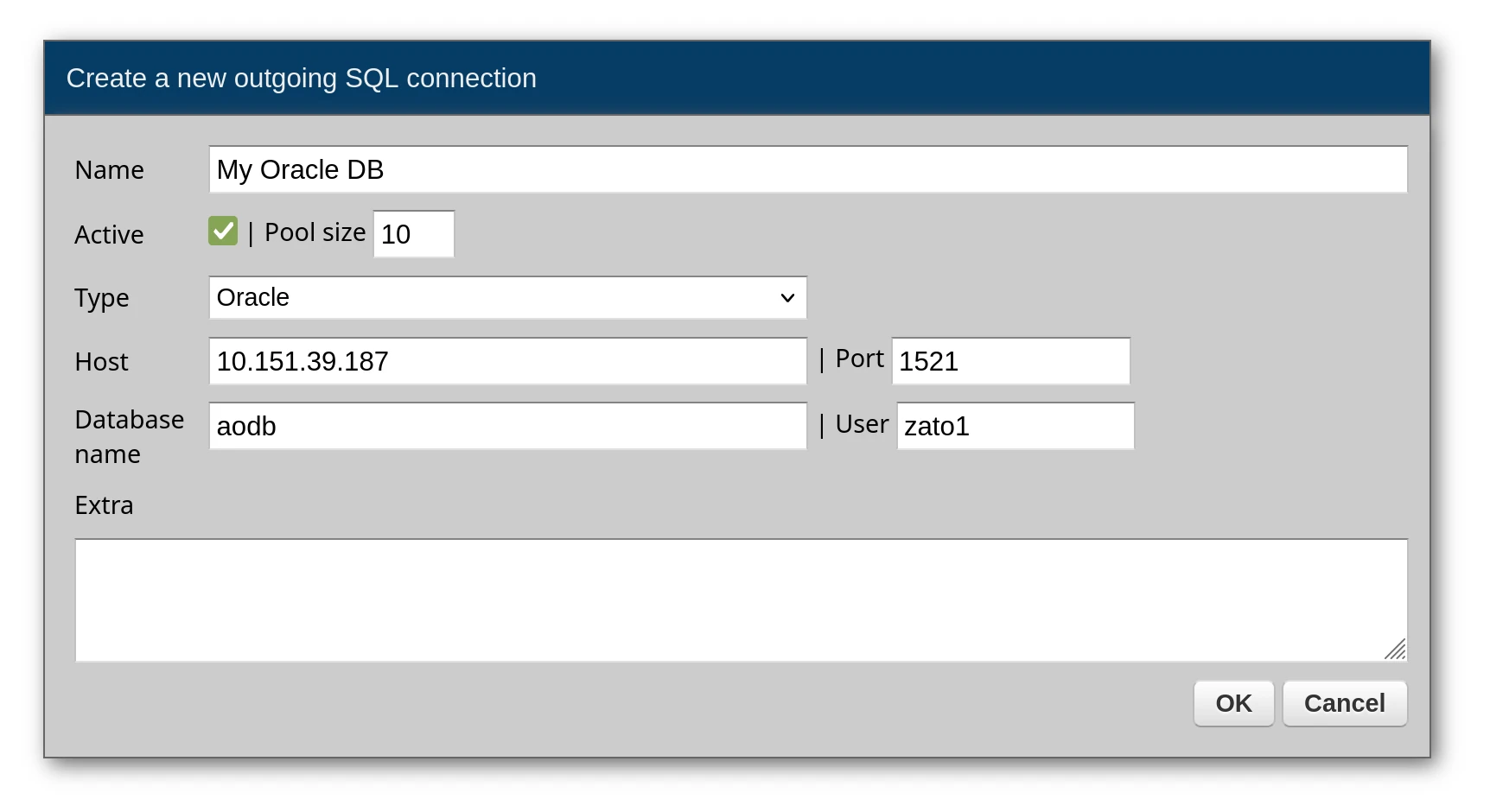
From the Dashboard, go to Connections -> Outgoing -> SQL and set up a new Oracle connection. The database name field is the service name of the database you connect to, e.g. FREEPDB1.
If your database is addressed by a SID rather than a service name, add use_sid=True to the connection's extra options.
Querying data
Send SQL to Oracle via conn.execute. Bind variables use the :name syntax, and every row returned becomes a dictionary in the result list.
# -*- coding: utf-8 -*-

# Zato
from zato.server.service import Service

class GetAllUsers(Service):
    """ Returns all users from the database.
    """
    def handle(self):

        # Get the Oracle connection from the pool
        conn = self.out.sql['My Oracle DB']

        # Build the query
        query = 'SELECT * FROM users'

        # Execute the query - returns a list of dicts
        response = conn.execute(query)

        # Return the results to the caller
        self.response.payload = response
Response:
[
    {"user_id": 1, "username": "john.doe"},
    {"user_id": 2, "username": "jane.smith"},
    {"user_id": 3, "username": "bob.jones"}
]
Querying with parameters
Bind variables keep your queries safe from injection attacks - pass values through the params dictionary rather than concatenating strings:
# -*- coding: utf-8 -*-

# Zato
from zato.server.service import Service

class GetUserById(Service):
    """ Fetches a user by their user_id.
    """
    input = 'user_id'

    def handle(self):

        # Get the Oracle connection from the pool
        conn = self.out.sql['My Oracle DB']

        # Build the parameterized query
        query = 'SELECT * FROM users WHERE user_id = :user_id'

        # Assign input data to query parameters
        params = {'user_id': self.request.input.user_id}

        # Execute the query with parameters
        response = conn.execute(query, params)

        # Return the results to the caller
        self.response.payload = response
Returning a single row
For queries that should match exactly one record, conn.one returns that record directly. An exception occurs if zero or multiple rows match. Use conn.one_or_none when no match is acceptable:
# -*- coding: utf-8 -*-

# Zato
from zato.server.service import Service

class GetSingleUser(Service):
    """ Returns exactly one user, raises if not found.
    """
    input = 'user_id'

    def handle(self):

        # Get the Oracle connection from the pool
        conn = self.out.sql['My Oracle DB']

        # Build the query
        query = 'SELECT * FROM users WHERE user_id = :user_id'

        # Assign input data to query parameters
        params = {'user_id': self.request.input.user_id}

        # Run the query - returns a dict, raises if not found
        result = conn.one(query, params)

        # Return the result to the caller
        self.response.payload = result


class GetUserOrNone(Service):
    """ Returns a user or None if not found.
    """
    input = 'user_id'

    def handle(self):

        # Get the Oracle connection from the pool
        conn = self.out.sql['My Oracle DB']

        # Build the query
        query = 'SELECT * FROM users WHERE user_id = :user_id'

        # Assign input data to query parameters
        params = {'user_id': self.request.input.user_id}

        # Run the query - returns dict or None if not found
        result = conn.one_or_none(query, params)

        # Return the result or an error
        if result:
            self.response.payload = result
        else:
            self.response.payload = {'error': 'User not found'}
            self.response.status_code = 404
Calling stored procedures with input/output parameters
Oracle procedures frequently use IN and OUT parameters. Zato provides wrapper classes that handle the type conversions and let you read output values after the call:
# -*- coding: utf-8 -*-

# Zato
from zato.common.oracledb import NumberIn, NumberOut, StringIn, StringOut
from zato.server.service import Service

class CallProcessData(Service):
    """ Calls a stored procedure with input and output parameters.
    """
    def handle(self):

        # Get the Oracle connection from the pool
        conn = self.out.sql['My Oracle DB']

        # Prepare input parameters
        in_num = NumberIn(333)
        in_str = StringIn('Hello')

        # Prepare output parameters - the procedure will write to these
        out_num = NumberOut()
        out_str = StringOut(size=200)

        # Build the parameter list in the order expected by the procedure
        params = [in_num, in_str, out_num, out_str]

        # Call the stored procedure
        conn.callproc('process_data', params)

        # Extract and return the output values
        self.response.payload = {
            'output_num': out_num.get(),
            'output_str': out_str.get()
        }
Response:
Parameters must appear in the same sequence as declared in the procedure:
CREATE OR REPLACE PROCEDURE process_data (
    input_num   IN  NUMBER,
    input_str   IN  VARCHAR2,
    output_num  OUT NUMBER,
    output_str  OUT VARCHAR2
)
AS
BEGIN
    output_num := input_num * 2;
    output_str := 'Input was: ' || input_str;
END process_data;
Procedures returning multiple rows
Procedures that return result sets through REF CURSOR parameters work with RowsOut - the cursor is read while the call runs and rows_out.get() gives you its rows as a list of dictionaries, one per row:
# -*- coding: utf-8 -*-

# Zato
from zato.common.oracledb import RowsOut
from zato.server.service import Service

class GetUsersFromProcedure(Service):
    """ Calls a procedure that returns multiple rows via a cursor.
    """
    def handle(self):

        # Get the Oracle connection from the pool
        conn = self.out.sql['My Oracle DB']

        # Prepare the output parameter for the cursor
        rows_out = RowsOut()

        # Call the procedure - it will populate rows_out
        conn.callproc('get_users', [rows_out])

        # The rows the cursor returned, as a list of dicts
        rows = rows_out.get()

        # Return the rows to the caller
        self.response.payload = rows
Response:
The corresponding procedure:
CREATE OR REPLACE PROCEDURE get_users (
    recordset OUT SYS_REFCURSOR
)
AS
BEGIN
    OPEN recordset FOR
        SELECT user_id, username
        FROM users
        ORDER BY user_id;
END get_users;
Available parameter types
These wrapper classes handle Oracle-specific parameter binding:
| Class | Purpose |
|---|---|
NumberIn | Input NUMBER parameter |
NumberOut | Output NUMBER parameter |
StringIn | Input VARCHAR2 parameter |
StringOut | Output VARCHAR2 parameter (optionally specify size) |
RowsOut | Output SYS_REFCURSOR for result sets |
All wrappers live in zato.common.oracledb:
Extra options
When creating a connection in the Dashboard, you can provide extra options as a list of key=value pairs. Each option goes on its own line.
| Option | Description |
|---|---|
use_sid | Set to True if the database name is a SID rather than a service name |
arraysize | Number of rows fetched at a time (default: 50) |
pool_recycle | After how many seconds a pooled connection is replaced with a fresh one |
max_overflow | How many connections above the pool size may be opened under load |
Example in Dashboard:
Audit log
The connection's Audit log dropdown sets what the audit log stores per statement - outcome and duration only, the SQL text, the text with parameters, or everything with rows. A procedure call is stored as BEGIN name(); END;, its input values as the parameters, its OUT values as the rows.
How to avoid SQL injection attacks
Always use parameterized queries with named parameters (:param_name) rather than string formatting. This prevents SQL injection attacks and makes your queries more readable. With MS SQL, a :param_name marker with no matching parameter, or a parameter with no matching marker, is refused before the statement is sent to the database.
# Correct - parameterized query
query = 'SELECT * FROM users WHERE user_id = :user_id AND status = :status'
params = {'user_id': 123, 'status': 'active'}
result = conn.execute(query, params)

# Wrong - string formatting (vulnerable to SQL injection)
# query = f'SELECT * FROM users WHERE user_id = {user_id}'