@ Microsoft SQL Server in Python
Microsoft SQL Server is widely used in enterprise environments, particularly in organizations with existing Microsoft infrastructure. Zato provides direct support for MS SQL through connection pools configured in the Dashboard.
MS SQL connections in Zato support both stored procedure calls and direct SQL execution, giving you flexibility in how you interact with your databases.
In the Dashboard, navigate to Connections -> Outgoing -> SQL and create a new connection. Select MS SQL as the database type and provide your connection details.
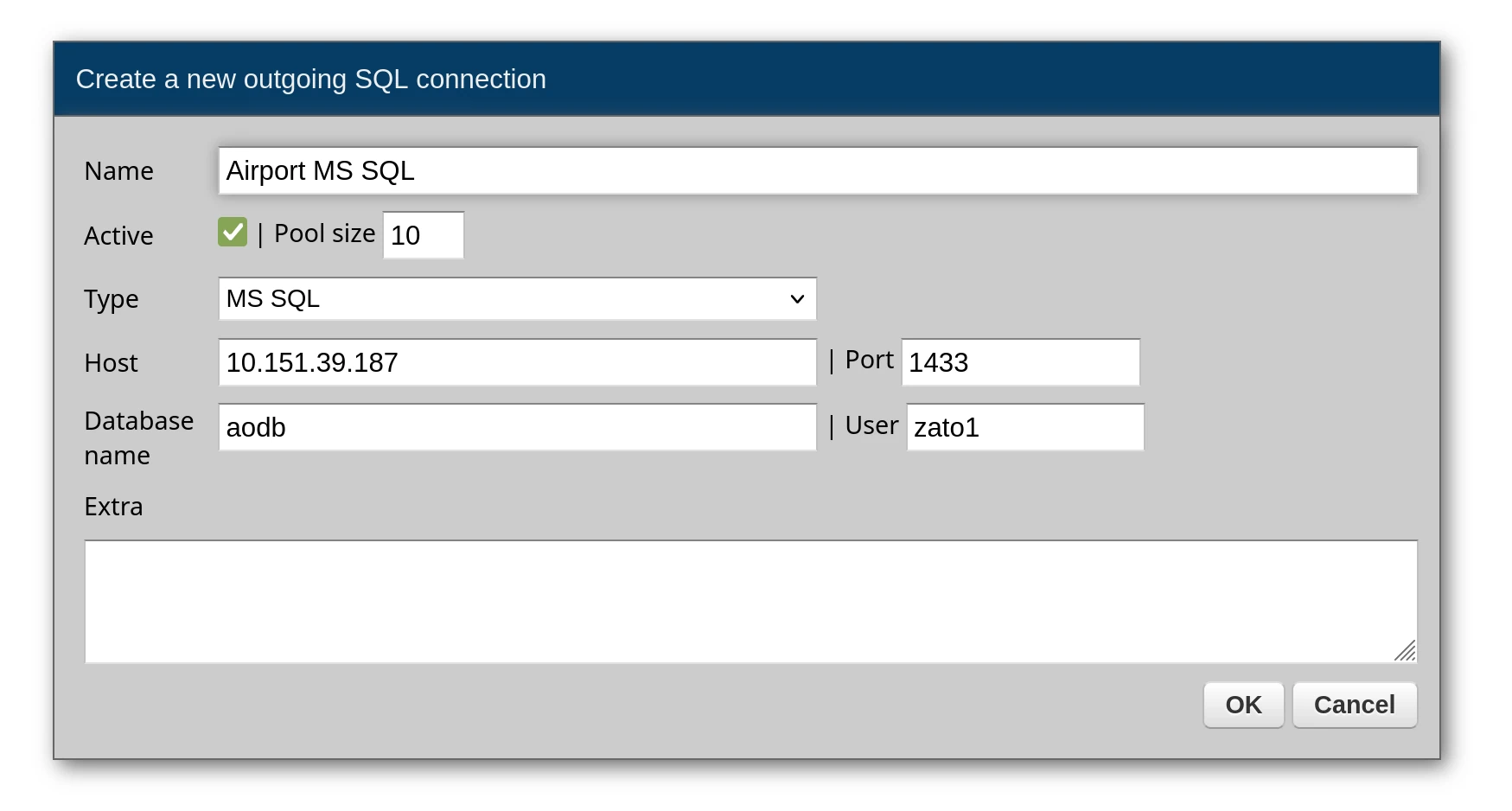
After creating the connection, change the default password and test the connection before using it in your services.
The most common pattern with MS SQL is calling stored procedures. Use session.callproc() to invoke a procedure and get the results.
# -*- coding: utf-8 -*-

# Zato
from zato.server.service import Service

class GetFlightManifest(Service):
    """ Returns the passenger manifest for a flight.
    """
    input = 'flight_id'

    def handle(self):

        # Connection name from Dashboard
        conn_name = 'Airport MS SQL'

        # Get connection and create session
        conn = self.outgoing.sql.get(conn_name)
        session = conn.session()

        # Stored procedure to call
        proc_name = 'spGetFlightManifest'

        # Build arguments list from input data
        args = [self.request.input.flight_id]

        # Call the procedure and get results
        data = session.callproc(proc_name, args)

        # Return the data to the caller
        self.response.payload = data
You can also execute SQL statements directly, including stored procedure calls with EXEC:
# -*- coding: utf-8 -*-

# Zato
from zato.server.service import Service

class GetCompanyGuarantors(Service):
    """ Returns a list of company guarantors from the database.
    """
    def handle(self):

        # Connection to use
        conn_name = 'Airport MS SQL'

        # SQL command - can be a stored procedure call
        command = 'EXEC company.spGetCompanyGuarantors'

        # Get connection and session
        conn = self.outgoing.sql.get(conn_name)
        session = conn.session()

        # Execute the command
        result = session.execute(command)

        # Build a list of guarantor objects from the result
        guarantors = []
        for row in result:
            guarantors.append({
                'company': row['CompanyName'],
                'company_id': row['CompanyIdentifier'],
                'guarantor': row['GuarantorName'],
                'email': row['GuarantorEmail'],
                'phone': row['GuarantorPhone']
            })

        # Return the guarantors to the caller
        self.response.payload = guarantors
MS SQL is commonly used for data warehousing. Here's how to query a data warehouse and format the results:
# -*- coding: utf-8 -*-

# stdlib
import datetime

# Zato
from zato.server.service import Service

class GetWeatherForecast(Service):
    """ Returns weather forecast data from the data warehouse.
    """
    def handle(self):

        # Connection to use
        conn_name = 'DataWarehouse'

        # Query to execute
        command = 'USE dw_warehouse; SELECT * FROM ssas.FlagWeatherForecast'

        # Get connection and session
        conn = self.outgoing.sql.get(conn_name)
        session = conn.session()

        # Execute query
        data = session.execute(command)

        # Format the data, converting datetime objects to strings
        result = []
        for item in data:
            formatted = {}
            for key, value in item.items():
                if isinstance(value, datetime.datetime):
                    formatted[key] = value.strftime('%Y-%m-%dT%H:%M:%S')
                else:
                    formatted[key] = value
            result.append(formatted)

        # Return the formatted data
        self.response.payload = result
Pass data to stored procedures as a list of arguments:
# -*- coding: utf-8 -*-

# Zato
from zato.server.service import Service

class InsertRetailData(Service):
    """ Inserts retail submission data via a stored procedure.
    """
    input = 'data'

    def handle(self):

        # Connection to use
        conn_name = 'Retail Database'

        # Stored procedure name
        proc_name = 'company.spInsertRetailSubmission'

        # Get connection and session
        conn = self.outgoing.sql.get(conn_name)
        session = conn.session()

        try:
            # Call the procedure with input data as an argument
            response = session.callproc(proc_name, [self.request.input.data])

            # Return success response
            self.response.payload = {'message': 'Data inserted successfully'}
            self.response.status_code = 201

        except Exception as e:
            # Log and return error
            self.logger.error(f'Error inserting data: {e}')
            self.response.payload = {'error': 'Unable to insert data'}
            self.response.status_code = 500
When a stored procedure returns many rows, use use_yield=True to process them one at a time without loading everything into memory:
# -*- coding: utf-8 -*-

# Zato
from zato.server.service import Service

class ProcessLargeDataset(Service):
    """ Processes a large dataset row by row without loading all into memory.
    """
    def handle(self):

        # Connection to use
        conn_name = 'DataWarehouse'

        # Get connection and session
        conn = self.outgoing.sql.get(conn_name)
        session = conn.session()

        # Stored procedure and date range arguments
        proc_name = 'spGetAllTransactions'
        args = ['2026-01-01', '2026-12-31']

        # use_yield=True returns a generator instead of loading all rows
        data = session.callproc(proc_name, args, use_yield=True)

        # Process each row individually
        processed_count = 0
        for row in data:
            self.invoke('transaction.process', data=row)
            processed_count += 1

        # Return the count of processed rows
        self.response.payload = {'processed': processed_count}
When calling procedures that execute and return results:
# -*- coding: utf-8 -*-

# stdlib
import csv
import decimal
import datetime
import io
from operator import itemgetter

# Zato
from zato.server.service import Service

class GetSecurityForecast(Service):
    """ Returns security capacity forecast data.
    """
    def handle(self):

        # Connection to use
        conn_name = 'DataWarehouse'

        # Stored procedure to execute
        command = 'EXECUTE dbo.SecCapFor'

        # Get connection and session
        conn = self.outgoing.sql.get(conn_name)
        session = conn.session()

        # Execute the procedure
        data = session.execute(command)

        # Sort by interval start time
        data.sort(key=itemgetter('IntervalStart'))

        # Format numeric and datetime values for JSON output
        result = []
        for item in data:
            formatted = {}
            for key, value in item.items():
                if isinstance(value, decimal.Decimal):
                    formatted[key] = float(value)
                elif isinstance(value, datetime.datetime):
                    formatted[key] = value.strftime('%m/%d/%Y %H:%M:%S')
                else:
                    formatted[key] = value
            result.append(formatted)

        # Return the formatted data
        self.response.payload = result
Always handle potential database errors gracefully:
# -*- coding: utf-8 -*-

# Zato
from zato.server.service import Service

class SafeDatabaseCall(Service):
    """ Demonstrates proper error handling for database calls.
    """
    def handle(self):

        # Connection to use
        conn_name = 'Airport MS SQL'

        # Get connection and session
        conn = self.outgoing.sql.get(conn_name)
        session = conn.session()

        try:
            # Execute the stored procedure
            result = session.execute('EXEC spGetFlightData @FlightID = 123')

            # Return the result
            self.response.payload = result

        except Exception as e:
            # Log error and return error response
            self.logger.error(f'Database error: {e}')
            self.response.payload = {'error': 'Database operation failed'}

        finally:
            # Clean up the session
            if hasattr(session, 'close'):
                session.close()
Always use parameterized queries with named parameters (:param_name) rather than string formatting. This prevents SQL injection attacks and makes your queries more readable.
# Correct - parameterized query
query = 'SELECT * FROM users WHERE user_id = :user_id AND status = :status'
params = {'user_id': 123, 'status': 'active'}
result = conn.execute(query, params)

# Wrong - string formatting (vulnerable to SQL injection)
# query = f'SELECT * FROM users WHERE user_id = {user_id}'
Book a demo with an expert who will help you build meaningful systems that match your ambitions
"For me, Zato Source is the only technology partner to help with operational improvements."
 - John Adams
Program Manager of Channel Enablement at Keysight 
