Connect to MySQL databases from your Zato services using managed connection pools. Configure the pool once in the Dashboard, then access it from any service without worrying about connection lifecycle or credentials.
In your Dashboard, head to Connections → Outgoing → SQL. Add a new connection with MySQL as the type and enter the host, port, database name, and credentials.
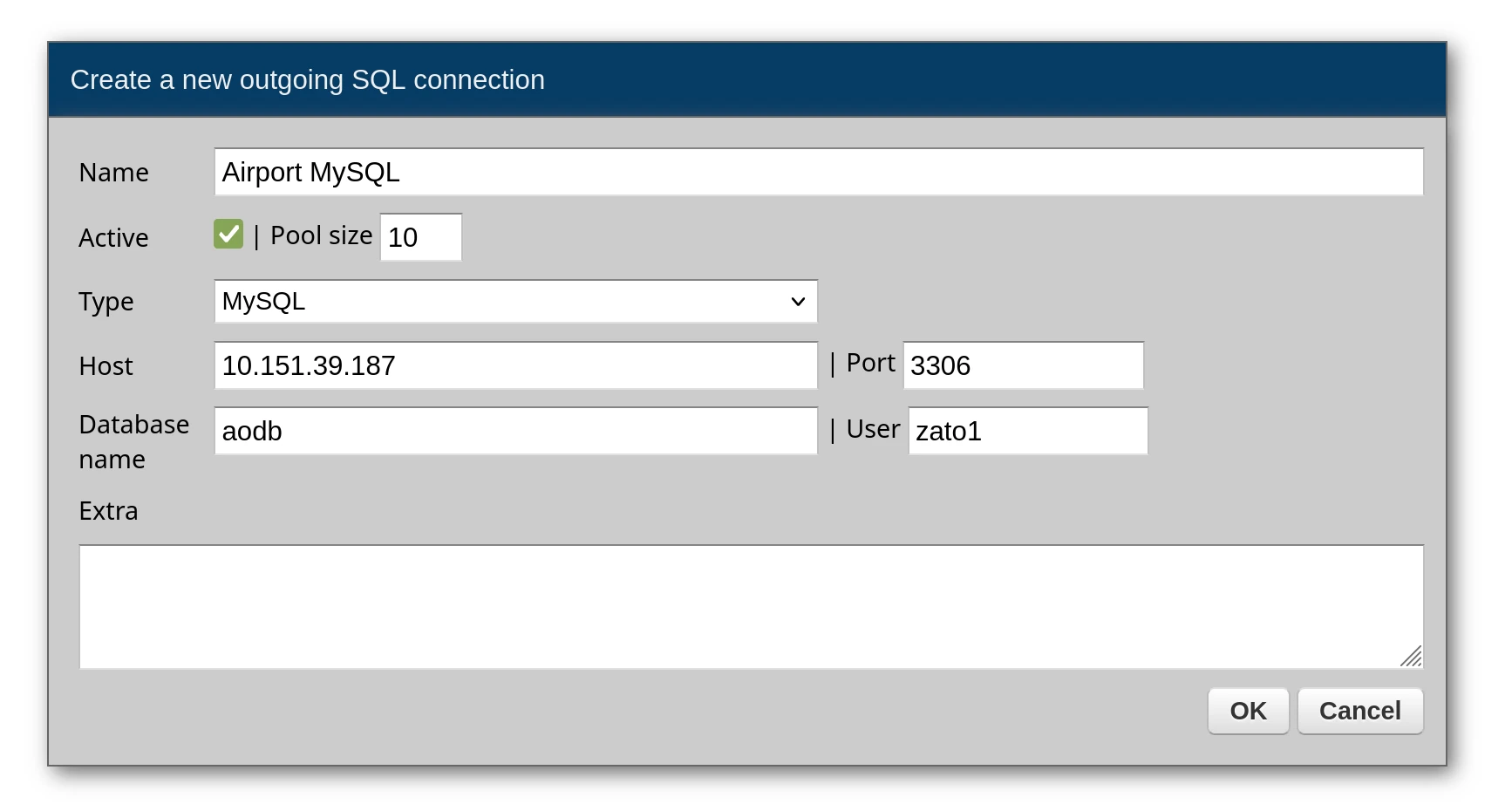
The connection is now ready - your services can use it immediately by referencing its name.
Run SQL statements through conn.execute, passing parameters as a dictionary. Results arrive as a list where each element is a dictionary representing one row.
# -*- coding: utf-8 -*-

# Zato
from zato.server.service import Service

class GetTerminals(Service):

    def handle(self):

        # Get the connection by name
        conn = self.out.sql['Airport MySQL']

        # Query with named parameter
        query = 'SELECT * FROM terminals WHERE is_active = :is_active'
        params = {'is_active': 1}

        # Execute returns a list of dicts
        result = conn.execute(query, params)

        self.response.payload = result
Response:
[
    {"terminal_id": 1, "name": "Terminal 1", "is_active": 1, "gates_count": 24},
    {"terminal_id": 2, "name": "Terminal 2", "is_active": 1, "gates_count": 18}
]
To fetch a single record, use conn.one - it returns that record as a dictionary and raises an exception if the query matches zero or more than one row:
# -*- coding: utf-8 -*-

# Zato
from zato.server.service import Service

class GetTerminalById(Service):
    """ Returns a single terminal by its ID.
    """
    input = 'terminal_id'

    def handle(self):

        # Get the connection from the pool
        conn = self.out.sql['Airport MySQL']

        # Build the query
        query = 'SELECT * FROM terminals WHERE terminal_id = :terminal_id'

        # Assign input data to query parameters
        params = {'terminal_id': self.request.input.terminal_id}

        # Run the query - returns a dict directly, raises if not found
        terminal = conn.one(query, params)

        # Return the result to the caller
        self.response.payload = terminal
When the record may or may not exist, conn.one_or_none is the right choice - it returns None for missing records rather than throwing an error:
# -*- coding: utf-8 -*-

# Zato
from zato.server.service import Service

class FindGateByCode(Service):
    """ Finds a gate by its code, returns None if not found.
    """
    input = 'code'

    def handle(self):

        # Get the connection from the pool
        conn = self.out.sql['Airport MySQL']

        # Build the query
        query = 'SELECT * FROM gates WHERE gate_code = :code'

        # Assign input data to query parameters
        params = {'code': self.request.input.code}

        # Run the query - returns dict or None if not found
        gate = conn.one_or_none(query, params)

        # Return the result or an error
        if gate:
            self.response.payload = gate
        else:
            self.response.payload = {'error': 'Gate not found'}
            self.response.status_code = 404
Adding new rows works the same way - build your INSERT statement with named placeholders and pass the values in a dictionary:
# -*- coding: utf-8 -*-

# Zato
from zato.server.service import Service

class CreateBaggageClaim(Service):
    """ Creates a new baggage claim record for a flight.
    """
    input = 'flight_id', 'carousel_number'

    def handle(self):

        # Get the connection from the pool
        conn = self.out.sql['Airport MySQL']

        # Build the INSERT query
        query = """
            INSERT INTO baggage_claims (flight_id, carousel_number, start_time)
            VALUES (:flight_id, :carousel, NOW())
        """

        # Assign input data to query parameters
        params = {
            'flight_id': self.request.input.flight_id,
            'carousel': self.request.input.carousel_number
        }

        # Execute the insert
        conn.execute(query, params)

        # Return success response
        self.response.payload = {'message': 'Baggage claim created'}
        self.response.status_code = 201
Modifying and removing records follows the same pattern - construct your statement and execute it:
# -*- coding: utf-8 -*-

# Zato
from zato.server.service import Service

class CloseGate(Service):
    """ Closes a gate by setting its status to closed.
    """
    input = 'gate_id'

    def handle(self):

        # Get the connection from the pool
        conn = self.out.sql['Airport MySQL']

        # Build the UPDATE query
        query = """
            UPDATE gates
            SET status = :status, closed_at = NOW()
            WHERE gate_id = :gate_id
        """

        # Assign input data to query parameters
        params = {
            'gate_id': self.request.input.gate_id,
            'status': 'closed'
        }

        # Execute the update
        conn.execute(query, params)

        # Return success response
        self.response.payload = {'message': 'Gate closed'}
Database queries often feed into other operations - loop through the results and call additional services for each record:
# -*- coding: utf-8 -*-

# Zato
from zato.server.service import Service

class NotifyDelayedFlights(Service):
    """ Finds delayed flights and sends notifications.
    """
    def handle(self):

        # Get the connection from the pool
        conn = self.out.sql['Airport MySQL']

        # Build the query to find delayed flights that haven't been notified
        query = """
            SELECT flight_id, airline_code, delay_minutes
            FROM flights
            WHERE delay_minutes > :threshold AND notified = 0
        """

        # Set the delay threshold parameter
        params = {'threshold': 30}

        # Execute and get all delayed flights
        delayed_flights = conn.execute(query, params)

        # Process each delayed flight
        for flight in delayed_flights:

            # Send notification via another service
            self.invoke('notification.send-delay-alert',
                flight_id=flight['flight_id'],
                delay_minutes=flight['delay_minutes']
            )

            # Mark the flight as notified
            update_query = 'UPDATE flights SET notified = 1 WHERE flight_id = :flight_id'
            conn.execute(update_query, {'flight_id': flight['flight_id']})
When creating a connection in the Dashboard, you can provide extra options as a list of key=value pairs. These are passed directly to the database driver. Each option goes on its own line.
| Option | Description |
|---|---|
charset | Character set for the connection (e.g., utf8mb4) |
connect_timeout | Connection timeout in seconds |
read_timeout | Timeout for reading from the connection |
write_timeout | Timeout for writing to the connection |
ssl_ca | Path to CA certificate file |
ssl_cert | Path to client certificate file |
ssl_key | Path to client private key file |
ssl_check_hostname | Verify server hostname matches certificate (true/false) |
Example in Dashboard:
Always use parameterized queries with named parameters (:param_name) rather than string formatting. This prevents SQL injection attacks and makes your queries more readable.
# Correct - parameterized query
query = 'SELECT * FROM users WHERE user_id = :user_id AND status = :status'
params = {'user_id': 123, 'status': 'active'}
result = conn.execute(query, params)

# Wrong - string formatting (vulnerable to SQL injection)
# query = f'SELECT * FROM users WHERE user_id = {user_id}'
Book a demo with an expert who will help you build meaningful systems that match your ambitions
"For me, Zato Source is the only technology partner to help with operational improvements."
 - John Adams
Program Manager of Channel Enablement at Keysight 
