Access Oracle databases from Zato through pooled connections defined in the Dashboard. Zato manages the connection lifecycle, so your services simply request a connection by name and start running queries.
Oracle connectivity requires the cx_Oracle library, which is not included by default. Add it to your server's Python dependencies as described in the extra Python libraries documentation.
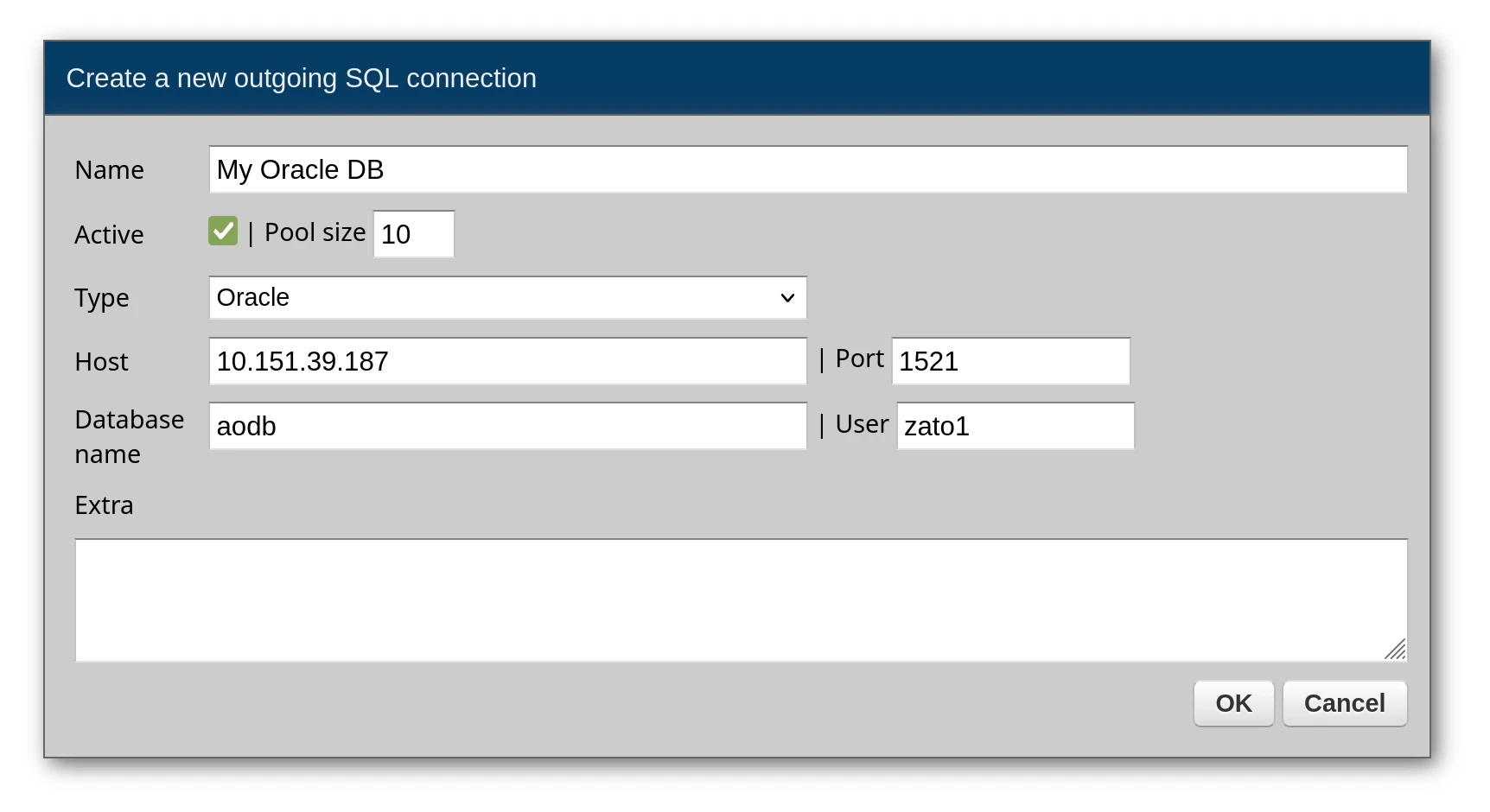
From the Dashboard, go to Connections -> Outgoing -> SQL and set up a new Oracle connection. Provide your TNS details or host/port/SID configuration.
Note that due to the limitations of the Oracle DB driver, the maximum connection pool size is 10. Setting it to a higher value is not supported.
Send SQL to Oracle via conn.execute. Bind variables use the :name syntax, and every row returned becomes a dictionary in the result list.
# -*- coding: utf-8 -*-

# Zato
from zato.server.service import Service

class GetAllUsers(Service):
    """ Returns all users from the database.
    """
    def handle(self):

        # Get the Oracle connection from the pool
        conn = self.out.sql['My Oracle DB']

        # Build the query
        query = 'SELECT * FROM users'

        # Execute the query - returns a list of dicts
        response = conn.execute(query)

        # Return the results to the caller
        self.response.payload = response
Response:
[
    {"user_id": 1, "username": "john.doe"},
    {"user_id": 2, "username": "jane.smith"},
    {"user_id": 3, "username": "bob.jones"}
]
Bind variables keep your queries safe from injection attacks - pass values through the params dictionary rather than concatenating strings:
# -*- coding: utf-8 -*-

# Zato
from zato.server.service import Service

class GetUserById(Service):
    """ Fetches a user by their user_id.
    """
    input = 'user_id'

    def handle(self):

        # Get the Oracle connection from the pool
        conn = self.out.sql['My Oracle DB']

        # Build the parameterized query
        query = 'SELECT * FROM users WHERE user_id = :user_id'

        # Assign input data to query parameters
        params = {'user_id': self.request.input.user_id}

        # Execute the query with parameters
        response = conn.execute(query, params)

        # Return the results to the caller
        self.response.payload = response
For queries that should match exactly one record, conn.one hands you that record directly. An exception occurs if zero or multiple rows match. Use conn.one_or_none when no match is acceptable:
# -*- coding: utf-8 -*-

# Zato
from zato.server.service import Service

class GetSingleUser(Service):
    """ Returns exactly one user, raises if not found.
    """
    input = 'user_id'

    def handle(self):

        # Get the Oracle connection from the pool
        conn = self.out.sql['My Oracle DB']

        # Build the query
        query = 'SELECT * FROM users WHERE user_id = :user_id'

        # Assign input data to query parameters
        params = {'user_id': self.request.input.user_id}

        # Run the query - returns a dict, raises if not found
        result = conn.one(query, params)

        # Return the result to the caller
        self.response.payload = result


class GetUserOrNone(Service):
    """ Returns a user or None if not found.
    """
    input = 'user_id'

    def handle(self):

        # Get the Oracle connection from the pool
        conn = self.out.sql['My Oracle DB']

        # Build the query
        query = 'SELECT * FROM users WHERE user_id = :user_id'

        # Assign input data to query parameters
        params = {'user_id': self.request.input.user_id}

        # Run the query - returns dict or None if not found
        result = conn.one_or_none(query, params)

        # Return the result or an error
        if result:
            self.response.payload = result
        else:
            self.response.payload = {'error': 'User not found'}
            self.response.status_code = 404
Oracle procedures frequently use IN and OUT parameters. Zato provides wrapper classes that handle the type conversions and let you read output values after the call:
# -*- coding: utf-8 -*-

# Zato
from zato.common.oracledb import NumberIn, NumberOut, StringIn, StringOut
from zato.server.service import Service

class CallProcessData(Service):
    """ Calls a stored procedure with input and output parameters.
    """
    def handle(self):

        # Get the Oracle connection from the pool
        conn = self.out.sql['My Oracle DB']

        # Prepare input parameters
        in_num = NumberIn(333)
        in_str = StringIn('Hello')

        # Prepare output parameters - the procedure will write to these
        out_num = NumberOut()
        out_str = StringOut(size=200)

        # Build the parameter list in the order expected by the procedure
        params = [in_num, in_str, out_num, out_str]

        # Call the stored procedure
        conn.callproc('process_data', params)

        # Extract and return the output values
        self.response.payload = {
            'output_num': out_num.get(),
            'output_str': out_str.get()
        }
Response:
Parameters must appear in the same sequence as declared in the procedure:
CREATE OR REPLACE PROCEDURE process_data (
    input_num   IN  NUMBER,
    input_str   IN  VARCHAR2,
    output_num  OUT NUMBER,
    output_str  OUT VARCHAR2
)
AS
BEGIN
    output_num := input_num * 2;
    output_str := 'Input was: ' || input_str;
END process_data;
Procedures that return result sets through REF CURSOR parameters work with RowsOut - it captures the cursor and lets you iterate the rows:
# -*- coding: utf-8 -*-

# Zato
from zato.common.oracledb import RowsOut
from zato.server.service import Service

class GetUsersFromProcedure(Service):
    """ Calls a procedure that returns multiple rows via a cursor.
    """
    def handle(self):

        # Get the Oracle connection from the pool
        conn = self.out.sql['My Oracle DB']

        # Prepare the output parameter for the cursor
        rows_out = RowsOut()

        # Call the procedure - it will populate rows_out
        conn.callproc('get_users', [rows_out])

        # Extract the rows from the cursor
        rows = list(rows_out.get())

        # Return the rows to the caller
        self.response.payload = rows
The corresponding procedure:
CREATE OR REPLACE PROCEDURE get_users (
    recordset OUT SYS_REFCURSOR
)
AS
BEGIN
    OPEN recordset FOR
        SELECT user_id, username
        FROM users
        ORDER BY user_id;
END get_users;
These wrapper classes handle Oracle-specific parameter binding:
| Class | Purpose |
|---|---|
NumberIn | Input NUMBER parameter |
NumberOut | Output NUMBER parameter |
StringIn | Input VARCHAR2 parameter |
StringOut | Output VARCHAR2 parameter (optionally specify size) |
RowsOut | Output SYS_REFCURSOR for result sets |
All wrappers live in zato.common.oracledb:
When creating a connection in the Dashboard, you can provide extra options as a list of key=value pairs. These are passed directly to the database driver. Each option goes on its own line.
| Option | Description |
|---|---|
encoding | Character encoding (e.g., UTF-8) |
nencoding | National character set encoding |
mode | Connection mode (SYSDBA, SYSOPER) |
arraysize | Number of rows fetched at a time (default: 50) |
service_name | Oracle service name (alternative to SID) |
Example in Dashboard:
Always use parameterized queries with named parameters (:param_name) rather than string formatting. This prevents SQL injection attacks and makes your queries more readable.
# Correct - parameterized query
query = 'SELECT * FROM users WHERE user_id = :user_id AND status = :status'
params = {'user_id': 123, 'status': 'active'}
result = conn.execute(query, params)

# Wrong - string formatting (vulnerable to SQL injection)
# query = f'SELECT * FROM users WHERE user_id = {user_id}'
Book a demo with an expert who will help you build meaningful systems that match your ambitions
"For me, Zato Source is the only technology partner to help with operational improvements."
 - John Adams
Program Manager of Channel Enablement at Keysight 
