Zato lets you work with PostgreSQL databases directly from your Python services. You set up connection pools in the Dashboard, and Zato takes care of managing connections, credentials, and pooling behind the scenes.
Open the Dashboard and go to Connections → Outgoing → SQL. Create a new connection, choose PostgreSQL, and fill in your database details.
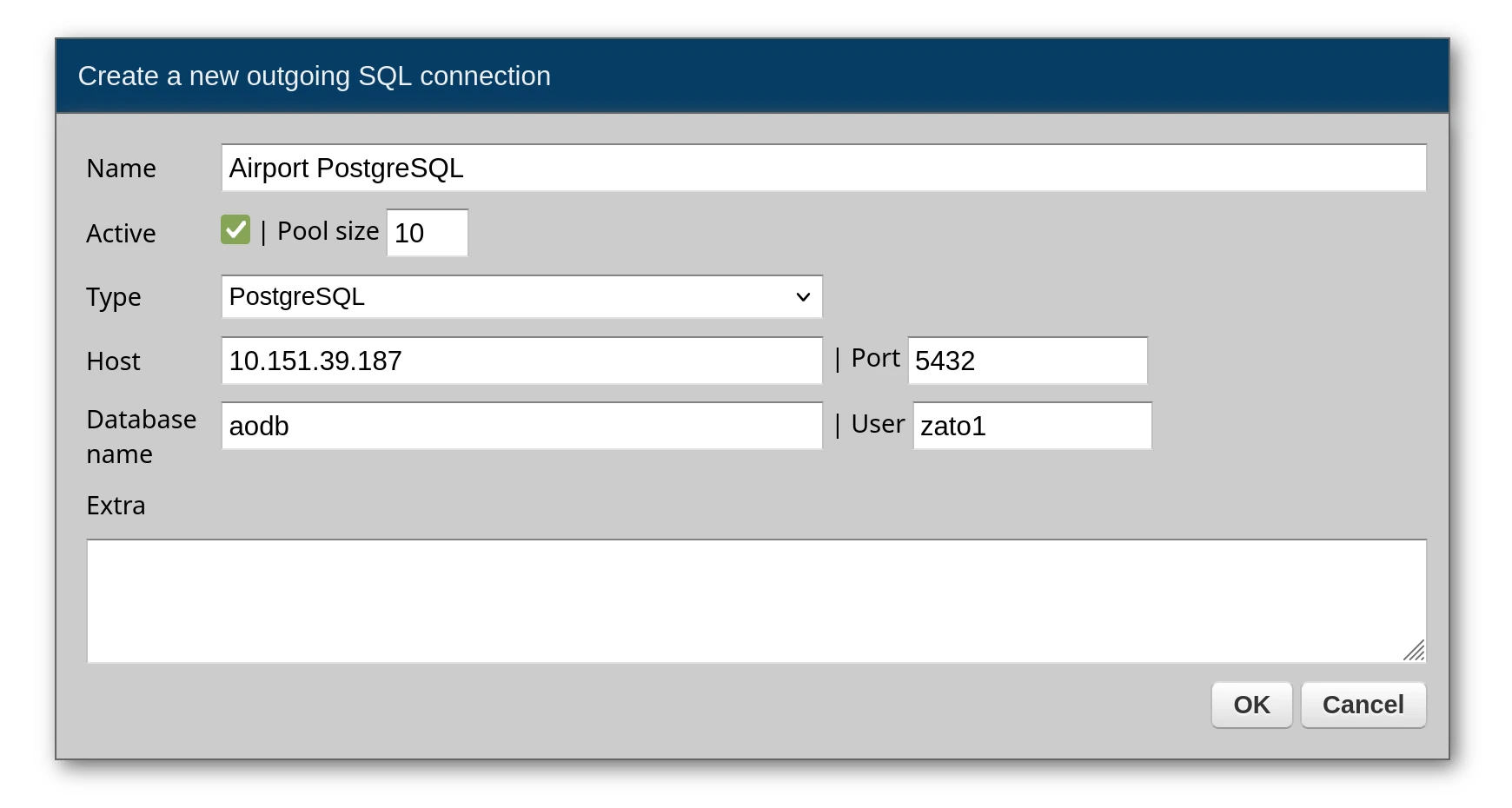
Once saved, the connection becomes available to all your services by its configured name.
Call conn.execute with your SQL and a dictionary of parameters. Each row comes back as a dictionary in a list.
# -*- coding: utf-8 -*-

# Zato
from zato.server.service import Service

class GetActiveRunways(Service):

    def handle(self):

        # Get the connection by the name configured in Dashboard
        conn = self.out.sql['Airport PostgreSQL']

        # Query with named parameter
        query = 'SELECT * FROM runways WHERE status = :status'
        params = {'status': 'active'}

        # Execute returns a list of dicts
        result = conn.execute(query, params)

        self.response.payload = result
Response:
[
    {"runway_id": 1, "name": "09L/27R", "status": "active", "length_m": 3054},
    {"runway_id": 2, "name": "09R/27L", "status": "active", "length_m": 3800}
]
If your query should return exactly one row, conn.one gives you that row directly as a dictionary. It raises an exception when zero or multiple rows come back.
# -*- coding: utf-8 -*-

# Zato
from zato.server.service import Service

class GetRunwayById(Service):
    """ Returns a single runway by its ID.
    """
    input = 'runway_id'

    def handle(self):

        # Get the connection from the pool
        conn = self.out.sql['Airport PostgreSQL']

        # Build the query
        query = 'SELECT * FROM runways WHERE runway_id = :runway_id'

        # Assign input data to query parameters
        params = {'runway_id': self.request.input.runway_id}

        # Run the query - returns a dict directly, raises if not found
        runway = conn.one(query, params)

        # Return the result to the caller
        self.response.payload = runway
For cases where the row might not exist, conn.one_or_none returns None instead of raising an exception:
# -*- coding: utf-8 -*-

# Zato
from zato.server.service import Service

class FindRunwayByName(Service):
    """ Finds a runway by its name, returns None if not found.
    """
    input = 'name'

    def handle(self):

        # Get the connection from the pool
        conn = self.out.sql['Airport PostgreSQL']

        # Build the query
        query = 'SELECT * FROM runways WHERE name = :name'

        # Assign input data to query parameters
        params = {'name': self.request.input.name}

        # Run the query - returns dict or None if not found
        runway = conn.one_or_none(query, params)

        # Return the result or an error
        if runway:
            self.response.payload = runway
        else:
            self.response.payload = {'error': 'Runway not found'}
            self.response.status_code = 404
The execute method handles write operations too - pass your INSERT, UPDATE, or DELETE statement the same way:
# -*- coding: utf-8 -*-

# Zato
from zato.server.service import Service

class UpdateRunwayStatus(Service):
    """ Updates the status of a runway.
    """
    input = 'runway_id', 'status'

    def handle(self):

        # Get the connection from the pool
        conn = self.out.sql['Airport PostgreSQL']

        # Build the UPDATE query
        query = """
            UPDATE runways
            SET status = :status, updated_at = NOW()
            WHERE runway_id = :runway_id
        """

        # Assign input data to query parameters
        params = {
            'runway_id': self.request.input.runway_id,
            'status': self.request.input.status
        }

        # Execute the update
        conn.execute(query, params)

        # Return success response
        self.response.payload = {'message': 'Runway status updated'}
Your parameter dictionary can contain as many values as the query needs:
# -*- coding: utf-8 -*-

# Zato
from zato.server.service import Service

class SearchFlights(Service):
    """ Searches for flights by origin, destination, and date.
    """
    input = 'origin', 'destination', 'date'

    def handle(self):

        # Get the connection from the pool
        conn = self.out.sql['Airport PostgreSQL']

        # Build the search query
        query = """
            SELECT * FROM flights
            WHERE origin = :origin
              AND destination = :destination
              AND departure_date = :date
            ORDER BY departure_time
        """

        # Assign input data to query parameters
        params = {
            'origin': self.request.input.origin,
            'destination': self.request.input.destination,
            'date': self.request.input.date
        }

        # Execute the query
        flights = conn.execute(query, params)

        # Return the results
        self.response.payload = flights
Query results often drive subsequent service calls - iterate through rows and invoke other services as needed:
# -*- coding: utf-8 -*-

# Zato
from zato.server.service import Service

class SyncFlightGates(Service):
    """ Assigns gates to flights that don't have one.
    """
    def handle(self):

        # Get the connection from the pool
        conn = self.out.sql['Airport PostgreSQL']

        # Build the query to find flights without gate assignments
        query = """
            SELECT flight_id, airline_code, scheduled_time
            FROM flights
            WHERE gate_id IS NULL AND status = :status
        """

        # Set query parameters
        params = {'status': 'scheduled'}

        # Execute the query
        flights = conn.execute(query, params)

        # Process each flight that needs a gate
        for flight in flights:

            # Find an available gate via another service
            gate = self.invoke('gate.assignment.get-available',
                airline=flight['airline_code'],
                time=flight['scheduled_time']
            )

            # Assign the gate if one was found
            if gate:
                self.invoke('flight.gate.assign',
                    flight_id=flight['flight_id'],
                    gate_id=gate['gate_id']
                )
When creating a connection in the Dashboard, you can provide extra options as a list of key=value pairs. These are passed directly to the database driver. Each option goes on its own line.
| Option | Description |
|---|---|
client_encoding | Character encoding for the connection (e.g., utf8) |
connect_timeout | Connection timeout in seconds |
application_name | Name shown in PostgreSQL's pg_stat_activity |
options | Command-line options sent to the server |
tcp_user_timeout | TCP user timeout in milliseconds |
Example in Dashboard:
Always use parameterized queries with named parameters (:param_name) rather than string formatting. This prevents SQL injection attacks and makes your queries more readable.
# Correct - parameterized query
query = 'SELECT * FROM users WHERE user_id = :user_id AND status = :status'
params = {'user_id': 123, 'status': 'active'}
result = conn.execute(query, params)

# Wrong - string formatting (vulnerable to SQL injection)
# query = f'SELECT * FROM users WHERE user_id = {user_id}'
Book a demo with an expert who will help you build meaningful systems that match your ambitions
"For me, Zato Source is the only technology partner to help with operational improvements."
 - John Adams
Program Manager of Channel Enablement at Keysight 
