Zato can generate OpenAPI specifications for your REST APIs. OpenAPI definitions describe your API endpoints, request/response schemas, and security requirements in a standard format that tools like Swagger UI, Postman, API gateways, and code generators understand.
OpenAPI specs are built from data models defined in your services. Models are Python dataclasses that describe the structure of your request and response objects. When you assign a model to a service's input or output, Zato automatically extracts the schema information to generate the OpenAPI specification.
You can generate OpenAPI specs in two ways:
OpenAPI channels group multiple REST channels together into a single API specification. To create one:
Connections → Channels → OpenAPI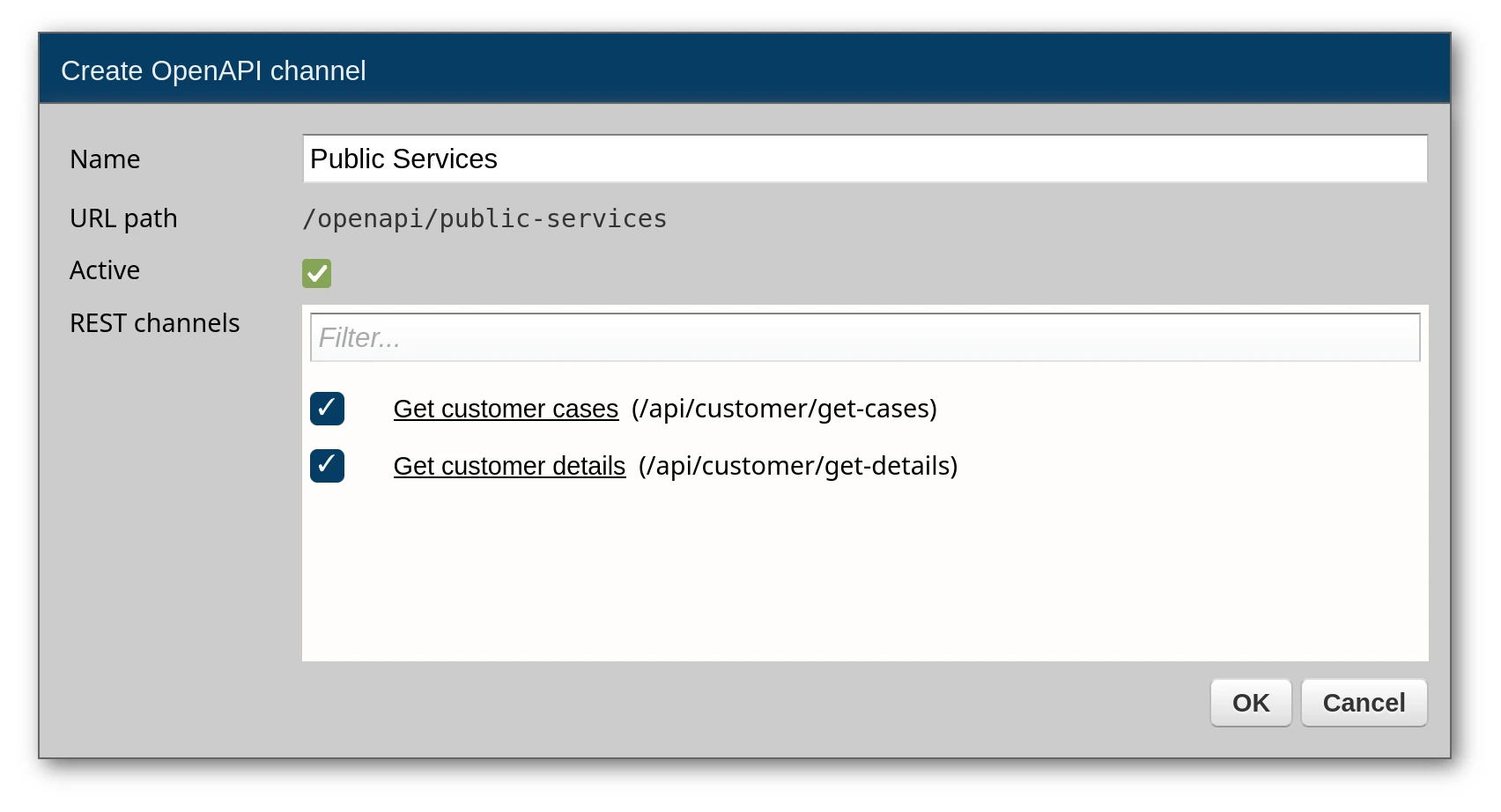
Configuration fields:
| Field | Purpose |
|---|---|
| Name | Unique identifier for this OpenAPI channel |
| REST channels | The REST channels to include in this specification |
The channel name is automatically slugified to create the URL path for the OpenAPI endpoint. For example, a channel named My API v2 becomes accessible at /openapi/my-api-v2.
After creating the OpenAPI channel, add REST channels to it:
Edit the OpenAPI channel
In the REST channels section, use the tri-state checkbox to configure each channel:

A single channel may be a part of more than one OpenAPI spec, and only channels marked as On will appear in the generated OpenAPI specification, so in the screenshot above, neither of them will, because the first one is disabled and the other is off.
To download the OpenAPI YAML file:
Connections → Channels → OpenAPI
The downloaded file contains the complete OpenAPI specification including:
input definitions)output definitions)For a service with typed input/output models:
from dataclasses import dataclass
from zato.server.service import Model, Service

@dataclass(init=False)
class GetCustomerRequest(Model):
    customer_id: str

@dataclass(init=False)
class GetCustomerResponse(Model):
    name: str
    email: str

class GetCustomer(Service):
    name = 'customer.get'
    input = GetCustomerRequest
    output = GetCustomerResponse

    def handle(self):
        pass
The generated OpenAPI will include full schemas:
openapi: 3.1.0
info:
  title: My API
  version: 1.0.0
paths:
  /api/customer:
    post:
      summary: Invoke customer.get
      operationId: customer_get
      requestBody:
        required: true
        content:
          application/json:
            schema:
              $ref: '#/components/schemas/GetCustomerRequest'
      responses:
        '200':
          description: Successful response
          content:
            application/json:
              schema:
                $ref: '#/components/schemas/GetCustomerResponse'
      security:
        - my-basic-auth: []
components:
  schemas:
    GetCustomerRequest:
      type: object
      properties:
        customer_id:
          type: string
      required:
        - customer_id
    GetCustomerResponse:
      type: object
      properties:
        name:
          type: string
        email:
          type: string
      required:
        - name
        - email
  securitySchemes:
    my-basic-auth:
      type: http
      scheme: basic
You can also access OpenAPI specifications programmatically via HTTP. See the OpenAPI endpoint tab for details.
Zato exposes an HTTP endpoint for programmatic access to OpenAPI specifications:
This endpoint requires HTTP Basic Auth credentials matching one of the REST channels included in the OpenAPI channel.
The endpoint validates credentials against the Basic Auth security definitions attached to the REST channels in your OpenAPI channel. If any REST channel in the OpenAPI channel has a Basic Auth security definition, those credentials can be used to access the specification.
If credentials are missing or invalid, the endpoint returns HTTP 403 Forbidden.
Assuming you have:
my-apipubapi (username: apiuser, password: secret123)Access the specification:
Response:
openapi: 3.1.0
info:
  title: my-api
  version: 1.0.0
paths:
  /api/customer:
    post:
      summary: Invoke customer.get
      operationId: customer_get
      responses:
        '200':
          description: Successful response
          content:
            application/json:
              schema:
                $ref: '#/components/schemas/GetCustomerResponse'
      security:
        - pubapi: []
      requestBody:
        required: true
        content:
          application/json:
            schema:
              $ref: '#/components/schemas/GetCustomerRequest'
components:
  schemas:
    GetCustomerRequest:
      type: object
      properties:
        customer_id:
          type: string
      required:
        - customer_id
    GetCustomerResponse:
      type: object
      properties:
        name:
          type: string
        email:
          type: string
      required:
        - name
        - email
  securitySchemes:
    pubapi:
      type: http
      scheme: basic
