When your service needs to fetch data from or send data to an external system, you use outgoing REST connections. These connections are configured once in the Dashboard and reused across all your services - you never hardcode URLs or credentials in your Python code.
The pattern is always the same: get a connection by name, call a method like .get() or .post(), and work with the response. Zato handles connection pooling, serialization, and credential injection automatically.
For external systems that expose a GraphQL API rather than REST, Zato offers dedicated GraphQL outgoing connections.
Key features:
/customer/{cust_id}/order/{order_id} and fill in values at runtimeTo manage outgoing connections, go to Connections → Outgoing → REST in the Dashboard.

Click Create a new REST outgoing connection to manually configure a single connection.


Fill in the connection name, host, URL path, security, timeout and other settings.

Click OK, and that's it, you've just created an outgoing REST connection.
Click Import OpenAPI to bulk-create connections from an OpenAPI/Swagger specification. You can import by:


In the next step, select which endpoints to import from the table and click OK.
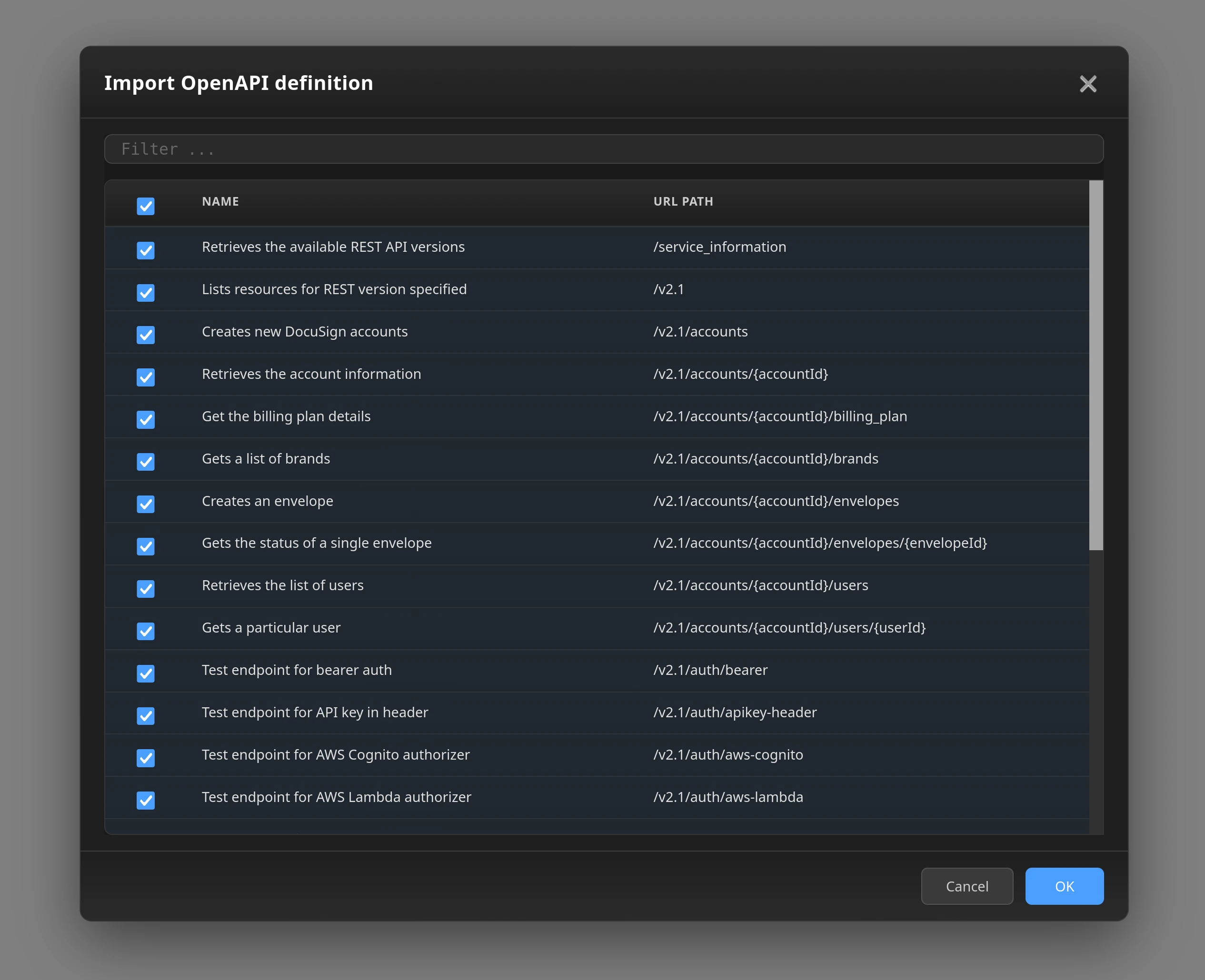
The import creates:
The way they work, OpenAPI specs describe authentication requirements but do not contain actual credentials. After importing, configure credentials for each security definition:
Once configured, outgoing connections using these security definitions will authenticate automatically.
No matter if you created REST connections manually, or if you imported them via OpenAPI, you use them in the same way. The connection name you use in code must match exactly what you entered in Dashboard.
# -*- coding: utf-8 -*-

# Zato
from zato.server.service import Service

class GetCustomer(Service):
    name = 'my.api.get-customer'

    def handle(self):

        # Get the connection by name - must match Dashboard exactly
        conn = self.out.rest['Customer API'].conn

        # Call the API - self.cid is the correlation ID for tracing
        response = conn.get(self.cid)

        # Response data is automatically parsed from JSON
        customer = response.data

        self.response.payload = customer
When you need to create resources or send data to an external API, use POST. Pass a Python dict as the second argument - Zato serializes it to JSON automatically.
# -*- coding: utf-8 -*-

# Zato
from zato.server.service import Service

class CreateOrder(Service):
    name = 'my.api.create-order'

    def handle(self):

        # Data to send - will be serialized to JSON automatically
        payload = {
            'customer_id': '12345',
            'items': [
                {'sku': 'ABC-001', 'quantity': 2},
                {'sku': 'XYZ-999', 'quantity': 1}
            ]
        }

        conn = self.out.rest['Orders API'].conn

        # POST the data - Zato converts the dict to JSON
        response = conn.post(self.cid, payload)

        self.response.payload = response.data
REST APIs typically need two kinds of parameters: path parameters (like /customers/123/orders) and query parameters (like ?status=pending). Zato handles both through a single params dict.
If your outgoing connection's URL path contains placeholders like /customers/{customer_id}/orders, Zato substitutes matching keys from params into the path. Remaining keys become query string parameters.
# -*- coding: utf-8 -*-

# Zato
from zato.server.service import Service

class GetCustomerOrders(Service):
    name = 'my.api.get-customer-orders'

    def handle(self):

        # Parameters - customer_id goes in path, status goes in query string
        params = {
            'customer_id': '12345',
            'status': 'pending'
        }

        conn = self.out.rest['Orders API'].conn

        # Zato substitutes {customer_id} in the path
        # and appends ?status=pending to the query string
        response = conn.get(self.cid, params=params)

        self.response.payload = response.data
Some APIs require custom headers for tracking, versioning, or localization. Pass a headers dict to include them in your outgoing request.
# -*- coding: utf-8 -*-

# Zato
from zato.server.service import Service

class CallWithHeaders(Service):
    name = 'my.api.call-with-headers'

    def handle(self):

        headers = {
            'X-Request-ID': self.cid,
            'X-Client-Version': '2.0',
            'Accept-Language': 'en-US'
        }

        conn = self.out.rest['External API'].conn

        response = conn.get(self.cid, headers=headers)

        self.response.payload = response.data
Using self.cid as a request ID is useful for distributed tracing - the same correlation ID flows through your logs and the external system's logs.
External APIs return HTTP status codes. Always check them before assuming the response contains valid data. Use Python's HTTPStatus enum for readable, maintainable code.
# -*- coding: utf-8 -*-

# stdlib
from http import HTTPStatus

# Zato
from zato.server.service import Service

class CheckResponseStatus(Service):
    name = 'my.api.check-status'

    def handle(self):

        conn = self.out.rest['External API'].conn
        response = conn.get(self.cid)

        # Check HTTP status code before using the data
        if response.status_code == HTTPStatus.OK:
            self.response.payload = response.data

        elif response.status_code == HTTPStatus.NOT_FOUND:
            self.response.payload = {'error': 'Not found'}
            self.response.status_code = HTTPStatus.NOT_FOUND

        else:
            raise Exception(f'API error: {response.status_code}')
When you raise an exception, Zato returns HTTP 500 to your caller. If you want to return a different status, set self.response.status_code explicitly as shown for the 404 case.
The connection object supports all standard HTTP methods:
conn.get(self.cid, params)      # GET
conn.post(self.cid, payload)    # POST
conn.put(self.cid, payload)     # PUT
conn.patch(self.cid, payload)   # PATCH
conn.delete(self.cid, params)   # DELETE
conn.head(self.cid)             # HEAD
conn.options(self.cid)          # OPTIONS
Here's a complete example combining path parameters, query string, payload, and custom headers:
# -*- coding: utf-8 -*-

# Zato
from zato.server.service import Service

class SetBillingInfo(Service):
    name = 'billing.set-info'

    def handle(self):

        # Python dict representing the payload we want to send across
        payload = {'billing':'395.7', 'currency':'EUR'}

        # Python dict with all the query parameters, including path and query string
        params = {'cust_id':'39175', 'phone_no':'271637517', 'priority':'normal'}

        # Headers the endpoint expects
        headers = {'X-App-Name': 'Zato', 'X-Environment':'Production'}

        # Obtains a connection object
        conn = self.outgoing.plain_http['Set Billing Info'].conn

        # Invoke the resource providing all the information on input
        response = conn.post(self.cid, payload, params, headers=headers)
Notes:
You never need to leave Python - serialization and deserialization are automatic, so you work with Python dataclasses or dictionaries only
The response object gives you access to the body, headers and other metadata that the endpoint returns
You can further simplify JSON endpoint access using the dedicated REST adapter
You can provide your own "timeout" parameter when invoking a REST outgoing connection. For instance, in the example below, it is set to 30 seconds.
If you don't set a timeout explicitly, it defaults to the Linux kernel's default of approximately 2 minutes.
When an external API is temporarily unavailable or a network error occurs, you can configure automatic retries with exponential backoff.
To enable retries, pass the max_retries parameter:
For more control, you can configure the backoff behavior:
response = conn.post(
    self.cid,
    payload,
    max_retries=5,             # Maximum number of retry attempts
    retry_sleep_time=2,        # Initial sleep time in seconds (doubles after each retry, up to 8s)
    retry_backoff_threshold=60 # Stop retrying after this many seconds of total sleep time
)
With these settings, the retry pattern would be: 2s → 4s → 8s → 8s → 8s → ... until either max_retries is reached or the total sleep time exceeds retry_backoff_threshold.
Retries are triggered on:
By default, retries are disabled (max_retries=0). When you enable retries, the default backoff settings are 2 seconds initial sleep and 60 seconds threshold.
