Webhooks are HTTP callbacks that external systems send to your application when events occur. Instead of polling an API repeatedly, you register a URL and the external system POSTs data to you when something happens.
In Zato, you receive webhooks by creating a REST channel that points to a service. The service gets the incoming JSON payload, processes it, and optionally triggers other actions like updating a database or calling another API.
Create a REST channel to receive webhook events.

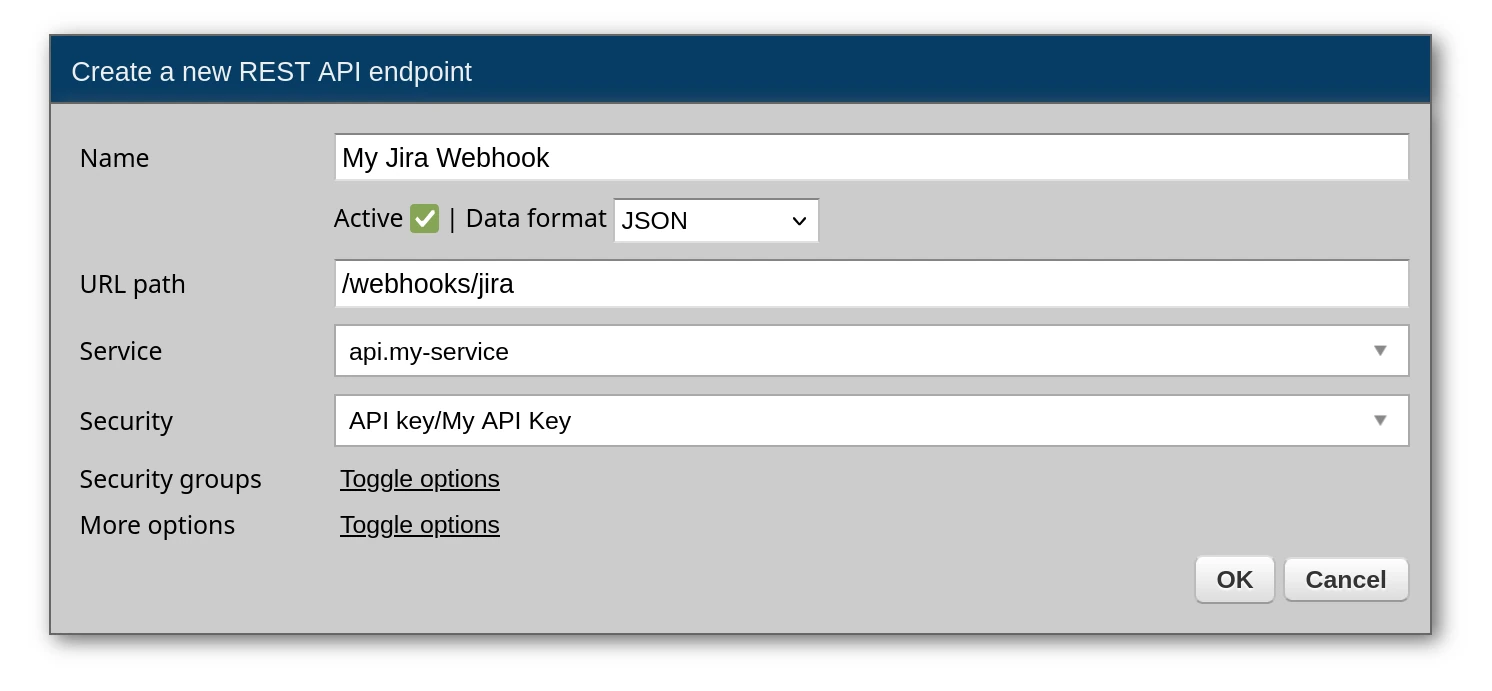
Key settings:
/webhooks/jira)Your webhook service receives the data in self.request.payload. The structure depends on what the external system sends - check their documentation.
# -*- coding: utf-8 -*-

# Zato
from zato.server.service import Service

class JiraWebhook(Service):
    name = 'webhooks.jira.receive'

    def handle(self):

        # Access the incoming webhook data
        event = self.request.payload

        # Log what we received
        self.logger.info(f'Received Jira event: {event.get("webhookEvent")}')

        # Extract event data
        issue_key = event.get('issue', {}).get('key')
        event_type = event.get('webhookEvent')

        # Process based on event type
        if event_type == 'jira:issue_created':
            self.handle_issue_created(issue_key, event)

        elif event_type == 'jira:issue_updated':
            self.handle_issue_updated(issue_key, event)

    def handle_issue_created(self, issue_key, event):
        self.logger.info(f'New issue created: {issue_key}')

    def handle_issue_updated(self, issue_key, event):
        self.logger.info(f'Issue updated: {issue_key}')
To test this locally, simulate what Jira sends:
curl -X POST http://localhost:11223/webhooks/jira \
  -d '{"webhookEvent": "jira:issue_created", "issue": {"key": "PROJ-123"}}'
Transform incoming webhook data to your internal format:
# -*- coding: utf-8 -*-

# stdlib
from dataclasses import dataclass

# Zato
from zato.server.service import Service

@dataclass
class AccessRequest:
    issue_key: str
    email: str
    company_name: str
    request_type: str

class AccessRequestWebhook(Service):
    name = 'webhooks.access-request.receive'

    def handle(self):

        # Get raw webhook data
        data = self.request.payload

        # Map to internal model
        request = AccessRequest(
            issue_key=data['issueKey'],
            email=data['email'],
            company_name=data['companyName'],
            request_type=data['requestType'],
        )

        # Pass to processing service
        self.invoke('access.request.process', request)
This separation keeps your webhook handler thin - it just transforms data and delegates to a processing service that can be tested independently.
Most webhook providers expect a quick 200 response. Do heavy processing asynchronously:
# -*- coding: utf-8 -*-

# Zato
from zato.server.service import Service

class ServiceNowWebhook(Service):
    name = 'webhooks.servicenow.receive'

    def handle(self):

        event = self.request.payload
        event_type = event.get('event_type')

        # Run in background instead of blocking
        self.invoke_async('servicenow.incident.process', {
            'event_type': event_type,
            'payload': event
        })

        # Return immediately
        self.response.payload = {'status': 'received'}
Many enterprise services sign webhooks for security. Verify the signature before processing:
# -*- coding: utf-8 -*-

# stdlib
import hashlib
import hmac
from http import HTTPStatus

# Zato
from zato.server.service import Service

class SalesforceWebhook(Service):
    name = 'webhooks.salesforce.receive'

    def handle(self):

        # Get the signature from headers
        signature = self.request.http.headers.get('X-Salesforce-Signature')

        # Get raw request body for verification
        raw_body = self.request.raw_request

        # Your webhook secret from Salesforce
        secret = self.config.salesforce.webhook_secret

        # Verify signature
        if not self.verify_signature(raw_body, signature, secret):
            self.response.status_code = HTTPStatus.UNAUTHORIZED
            self.response.payload = {'error': 'Invalid signature'}
            return

        # Signature valid, process the event
        event = self.request.payload
        self.process_salesforce_event(event)

    def verify_signature(self, payload, signature, secret):
        expected = hmac.new(
            secret.encode(),
            payload.encode(),
            hashlib.sha256
        ).hexdigest()
        return hmac.compare_digest(expected, signature)

    def process_salesforce_event(self, event):
        event_type = event.get('type')
        self.logger.info(f'Processing Salesforce event: {event_type}')
You can test webhook handlers with curl before connecting the real external system:
# Simulate a ServiceNow incident event
curl -X POST http://localhost:11223/webhooks/servicenow \
  -d '{"event_type": "incident.created", "incident": {"number": "INC0010001", "priority": "2"}}'

# Simulate a Salesforce opportunity event
curl -X POST http://localhost:11223/webhooks/salesforce \
  -H "X-Salesforce-Signature: your-test-signature" \
  -d '{"type": "opportunity.closed_won", "data": {"opportunity_id": "006xxx", "amount": 50000}}'
